<?xml version="1.0" encoding="utf-8"?>
<feed xmlns="http://www.w3.org/2005/Atom">
    <id>https://drivemate.forciit.com/release-notes</id>
    <title>DriveMate Docs Blog</title>
    <updated>2026-08-17T00:00:00.000Z</updated>
    <generator>https://github.com/jpmonette/feed</generator>
    <link rel="alternate" href="https://drivemate.forciit.com/release-notes"/>
    <subtitle>DriveMate Docs Blog</subtitle>
    <icon>https://drivemate.forciit.com/img/favicon.ico</icon>
    <entry>
        <title type="html"><![CDATA[DriveMate 4.6]]></title>
        <id>https://drivemate.forciit.com/release-notes/4.6</id>
        <link href="https://drivemate.forciit.com/release-notes/4.6"/>
        <updated>2026-08-17T00:00:00.000Z</updated>
        <summary type="html"><![CDATA[DriveMate 4.6 Release Notes]]></summary>
        <content type="html"><![CDATA[<h2 class="anchor anchorTargetStickyNavbar_Vzrq" id="new-features">New Features<a href="https://drivemate.forciit.com/release-notes/4.6#new-features" class="hash-link" aria-label="Direct link to New Features" title="Direct link to New Features" translate="no">​</a></h2>
<h3 class="anchor anchorTargetStickyNavbar_Vzrq" id="drivemate-google-cloud-console-application">DriveMate Google Cloud Console Application<a href="https://drivemate.forciit.com/release-notes/4.6#drivemate-google-cloud-console-application" class="hash-link" aria-label="Direct link to DriveMate Google Cloud Console Application" title="Direct link to DriveMate Google Cloud Console Application" translate="no">​</a></h3>
<p>DriveMate can now connect to Google Drive, Docs, and Sheets using <strong>DriveMate's shared Google Cloud Console Application</strong>. New orgs no longer need to create a Google Cloud project or paste a Client ID and Client Secret to complete setup.</p>
<p>On the <em>DriveMate Setup</em> page you can choose:</p>
<ul>
<li class=""><strong>DriveMate Google Cloud Console Application</strong> (default) — ready to use with no Google Cloud setup on your side</li>
<li class=""><strong>Your own Google Cloud Console Application</strong> — continue managing OAuth credentials in a Google Cloud project you create</li>
</ul>
<p>Authorization mode (<strong>company</strong> vs <strong>per user</strong>) remains a separate setup choice.</p>
<p>Changing the Google application requires re-authorization. Orgs that already use custom Client ID and Secret credentials keep that configuration after upgrade until they switch.</p>
<h4 class="anchor anchorTargetStickyNavbar_Vzrq" id="documentation-reference">Documentation Reference<a href="https://drivemate.forciit.com/release-notes/4.6#documentation-reference" class="hash-link" aria-label="Direct link to Documentation Reference" title="Direct link to Documentation Reference" translate="no">​</a></h4>
<ul>
<li class=""><strong><a class="" href="https://drivemate.forciit.com/setup">Setup Configuration Guide</a></strong></li>
<li class=""><strong><a class="" href="https://drivemate.forciit.com/setup/google-cloud-console-config">Google Cloud Console Configuration</a></strong> (only when using your own application)</li>
</ul>
<h3 class="anchor anchorTargetStickyNavbar_Vzrq" id="google-drive-folder-component---in-component-error-display">Google Drive Folder Component - In-Component Error Display<a href="https://drivemate.forciit.com/release-notes/4.6#google-drive-folder-component---in-component-error-display" class="hash-link" aria-label="Direct link to Google Drive Folder Component - In-Component Error Display" title="Direct link to Google Drive Folder Component - In-Component Error Display" translate="no">​</a></h3>
<p>The <strong>DriveMate - Google Drive Folder</strong> component can now show folder load errors inside the component instead of as a toast on the record page.</p>
<p>By default, behavior is unchanged: errors such as an invalid Google Drive Folder Id still appear as a toast. To show the error only inside the component, select <strong>Show errors inside the component?</strong> in Lightning App Builder.</p>
<p>This is useful when you do not want a page-level error banner for records whose folder Id is missing or incorrect.</p>
<h4 class="anchor anchorTargetStickyNavbar_Vzrq" id="documentation-reference-1">Documentation Reference<a href="https://drivemate.forciit.com/release-notes/4.6#documentation-reference-1" class="hash-link" aria-label="Direct link to Documentation Reference" title="Direct link to Documentation Reference" translate="no">​</a></h4>
<ul>
<li class=""><strong><a class="" href="https://drivemate.forciit.com/file-management/google-drive-folder-component">Google Drive Folder Component</a></strong></li>
</ul>]]></content>
        <category label="release" term="release"/>
        <category label="DriveMate 4.6" term="DriveMate 4.6"/>
        <category label="setup" term="setup"/>
        <category label="Google Cloud Console" term="Google Cloud Console"/>
        <category label="OAuth" term="OAuth"/>
        <category label="file management" term="file management"/>
        <category label="Google Drive Folder" term="Google Drive Folder"/>
    </entry>
    <entry>
        <title type="html"><![CDATA[DriveMate 4.3]]></title>
        <id>https://drivemate.forciit.com/release-notes/4.3</id>
        <link href="https://drivemate.forciit.com/release-notes/4.3"/>
        <updated>2026-06-30T00:00:00.000Z</updated>
        <summary type="html"><![CDATA[DriveMate 4.3 Release Notes]]></summary>
        <content type="html"><![CDATA[<h2 class="anchor anchorTargetStickyNavbar_Vzrq" id="new-features">New Features<a href="https://drivemate.forciit.com/release-notes/4.3#new-features" class="hash-link" aria-label="Direct link to New Features" title="Direct link to New Features" translate="no">​</a></h2>
<h3 class="anchor anchorTargetStickyNavbar_Vzrq" id="google-drive-folder-component---app-pages-home-pages-and-experience-cloud">Google Drive Folder Component - App Pages, Home Pages, and Experience Cloud<a href="https://drivemate.forciit.com/release-notes/4.3#google-drive-folder-component---app-pages-home-pages-and-experience-cloud" class="hash-link" aria-label="Direct link to Google Drive Folder Component - App Pages, Home Pages, and Experience Cloud" title="Direct link to Google Drive Folder Component - App Pages, Home Pages, and Experience Cloud" translate="no">​</a></h3>
<p><img decoding="async" loading="lazy" alt="DriveMate Google Drive Folder component - Experience Cloud" src="https://drivemate.forciit.com/assets/images/folderComponentShowcaseExperienceCloud-96c5b0971f6ec5e9be1a06c26624f75a.png" width="1502" height="606" class="img_ev3q"></p>
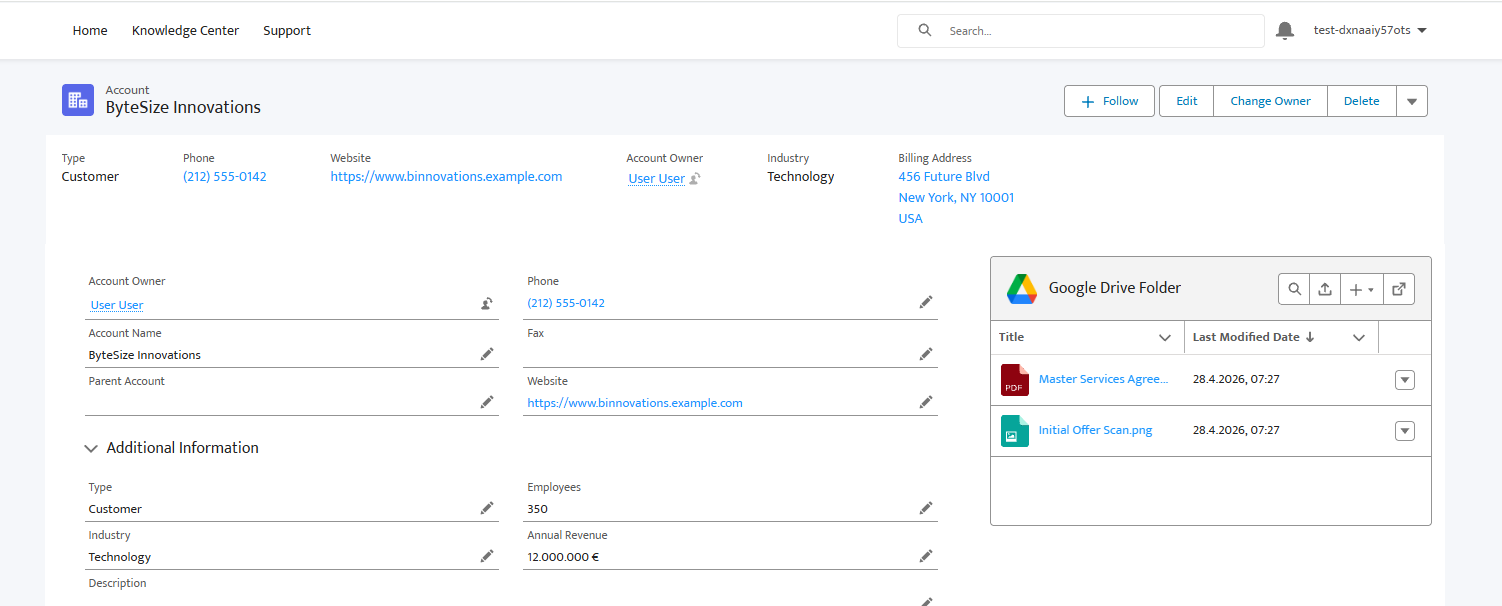
<p>The <strong>DriveMate - Google Drive Folder</strong> component is no longer limited to internal Salesforce record pages. You can now place it on <strong>app pages</strong>, <strong>home pages</strong>, and <strong>Experience Cloud</strong> pages, in addition to record pages.</p>
<p>The component supports two configuration modes:</p>
<ul>
<li class=""><strong>Record-linked mode</strong> - display the folder associated with a Salesforce record. Set <strong>Record ID</strong> and <strong>Folder field name</strong>. Typical placements include record pages and Experience Cloud record-detail pages.</li>
<li class=""><strong>Fixed-folder mode</strong> - display one specific shared folder that is not tied to a record. Set <strong>Folder ID</strong>. Typical placements include app pages, home pages, and Experience Cloud landing or custom pages.</li>
</ul>
<p>This makes it possible to build shared document libraries, partner portals, and customer-facing file views without requiring a record page context.</p>
<h4 class="anchor anchorTargetStickyNavbar_Vzrq" id="documentation-reference">Documentation Reference<a href="https://drivemate.forciit.com/release-notes/4.3#documentation-reference" class="hash-link" aria-label="Direct link to Documentation Reference" title="Direct link to Documentation Reference" translate="no">​</a></h4>
<ul>
<li class=""><strong><a class="" href="https://drivemate.forciit.com/file-management/google-drive-folder-component">Google Drive Folder Component</a></strong></li>
<li class=""><strong><a class="" href="https://drivemate.forciit.com/file-management/record-level-file-management">Record-level File Management</a></strong></li>
<li class=""><strong><a class="" href="https://drivemate.forciit.com/file-management/experience-cloud">File Management on Experience Cloud</a></strong></li>
</ul>
<h3 class="anchor anchorTargetStickyNavbar_Vzrq" id="drive-file-and-folder-access-management">Drive File and Folder Access Management<a href="https://drivemate.forciit.com/release-notes/4.3#drive-file-and-folder-access-management" class="hash-link" aria-label="Direct link to Drive File and Folder Access Management" title="Direct link to Drive File and Folder Access Management" translate="no">​</a></h3>
<p>DriveMate 4.3 introduces full Google Drive access management - both in the UI and through Flow/Apex automations.</p>
<h4 class="anchor anchorTargetStickyNavbar_Vzrq" id="in-the-component">In the Component<a href="https://drivemate.forciit.com/release-notes/4.3#in-the-component" class="hash-link" aria-label="Direct link to In the Component" title="Direct link to In the Component" translate="no">​</a></h4>
<p><img decoding="async" loading="lazy" alt="DriveMate Google Drive Folder component - share modal general view" src="https://drivemate.forciit.com/assets/images/folderComponentShareModalGeneralView-7fd1cf2ab7d91e839950b5c5c8f6f1e6.png" width="1292" height="603" class="img_ev3q">
<img decoding="async" loading="lazy" alt="DriveMate Google Drive Folder component - share files view" src="https://drivemate.forciit.com/assets/images/folderComponentShareModalShareFilesView-9e8214760ebe1a220ef72d1229e7e58b.png" width="1282" height="491" class="img_ev3q"></p>
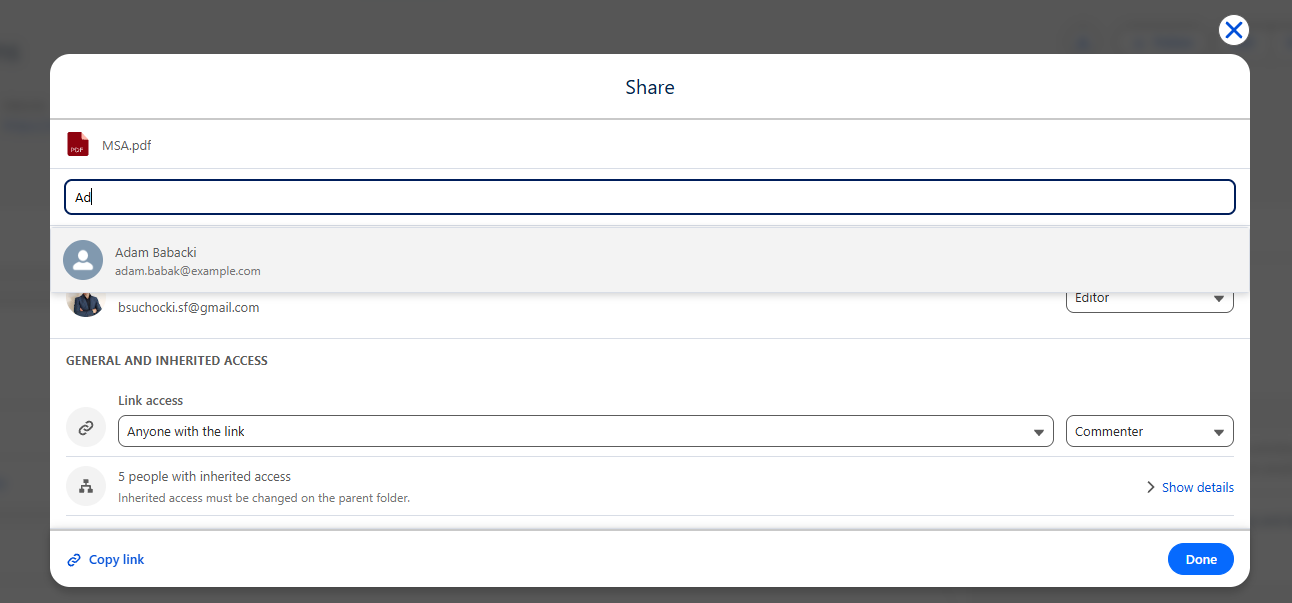
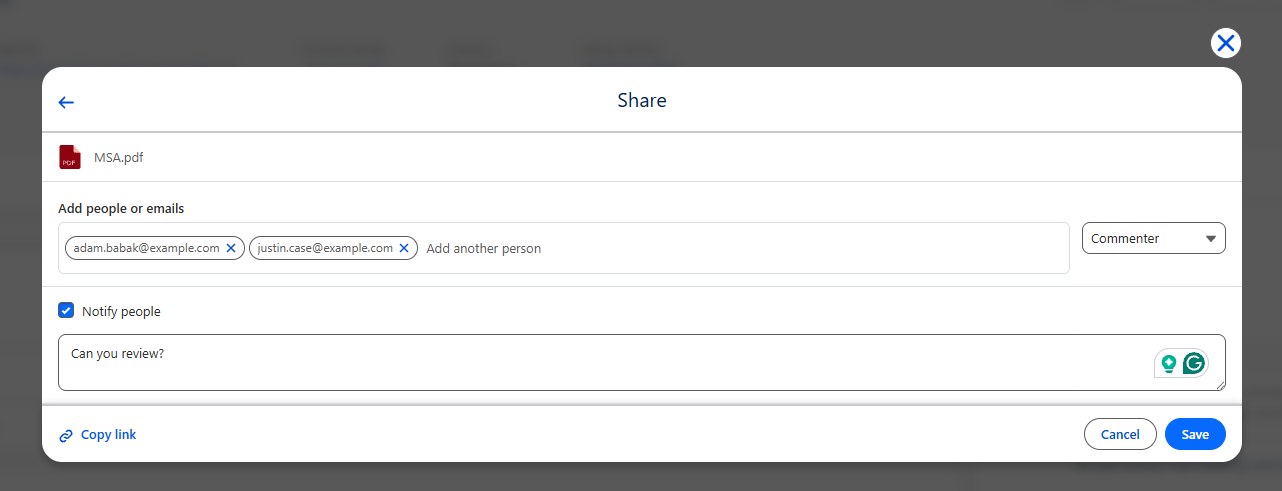
<p>When <strong>Show share option?</strong> component property is enabled, users can manage who can access the current folder or individual files and subfolders directly from the component. The share modal supports:</p>
<ul>
<li class="">Reviewing existing direct and inherited permissions</li>
<li class="">Adding recipients by Salesforce user search or email address</li>
<li class="">Changing access levels and removing direct access</li>
<li class="">Adjusting general access (restricted or anyone with the link)</li>
</ul>
<h4 class="anchor anchorTargetStickyNavbar_Vzrq" id="available-actions">Available Actions<a href="https://drivemate.forciit.com/release-notes/4.3#available-actions" class="hash-link" aria-label="Direct link to Available Actions" title="Direct link to Available Actions" translate="no">​</a></h4>
<ul>
<li class=""><strong><a class="" href="https://drivemate.forciit.com/file-management/automations-overview#share-drive-item">Share Drive Item</a></strong> - grant direct access to a file or folder for specified email addresses without reducing existing access.</li>
<li class=""><strong><a class="" href="https://drivemate.forciit.com/file-management/automations-overview#update-drive-item-sharing">Update Drive Item Sharing</a></strong> - set direct access to an exact level for each recipient, including downgrades and removal of direct access.</li>
<li class=""><strong><a class="" href="https://drivemate.forciit.com/file-management/automations-overview#get-drive-item-permissions">Get Drive Item Permissions</a></strong> - retrieve direct permissions, inherited permissions, and current public link sharing settings.</li>
<li class=""><strong><a class="" href="https://drivemate.forciit.com/file-management/automations-overview#update-drive-item-general-access">Update Drive Item General Access</a></strong> - enable or disable anyone-with-the-link access and set the link role.</li>
</ul>
<p><em>Note: See <strong><a class="" href="https://drivemate.forciit.com/file-management/automations-overview">Automations Overview</a></strong> for the full up-to-date list of all file management actions.</em></p>
<h4 class="anchor anchorTargetStickyNavbar_Vzrq" id="documentation-reference-1">Documentation Reference<a href="https://drivemate.forciit.com/release-notes/4.3#documentation-reference-1" class="hash-link" aria-label="Direct link to Documentation Reference" title="Direct link to Documentation Reference" translate="no">​</a></h4>
<ul>
<li class=""><strong><a class="" href="https://drivemate.forciit.com/file-management/google-drive-folder-component#managing-file-access">Google Drive Folder Component - Managing file access</a></strong></li>
<li class=""><strong><a class="" href="https://drivemate.forciit.com/file-management/automations-overview">Automations Overview</a></strong></li>
</ul>
<h2 class="anchor anchorTargetStickyNavbar_Vzrq" id="upgrade-required-actions">Upgrade Required Actions<a href="https://drivemate.forciit.com/release-notes/4.3#upgrade-required-actions" class="hash-link" aria-label="Direct link to Upgrade Required Actions" title="Direct link to Upgrade Required Actions" translate="no">​</a></h2>
<p><strong>If you upgrade from any <em>DriveMate 4.0</em> or earlier version</strong> and already have the <strong>DriveMate - Google Drive Folder</strong> component on record pages, you need to perform one manual step on each affected page to enable file sharing.</p>
<p>The <strong>Show share option?</strong> property is enabled by default in this release. However, Salesforce does not automatically apply new default component property values to pages that were configured before the package upgrade. To activate sharing on existing record pages:</p>
<ol>
<li class="">Open <strong>Lightning App Builder</strong> and edit each record page where the component is embedded.</li>
<li class="">Click the <strong>DriveMate - Google Drive Folder</strong> component (no property changes are required).</li>
<li class="">Save the page.</li>
</ol>
<p><img decoding="async" loading="lazy" alt="Lightning Page Resave Step" src="https://drivemate.forciit.com/assets/images/release4.3LightningPageResave-0d29a399364055b30a41d411728dfdf2.png" width="1914" height="765" class="img_ev3q"></p>
<p>After saving, the share option will be available on that page according to the component configuration.</p>
<div class="theme-admonition theme-admonition-note admonition_xJq3 alert alert--secondary"><div class="admonitionHeading_Gvgb"><span class="admonitionIcon_Rf37"><svg viewBox="0 0 14 16"><path fill-rule="evenodd" d="M6.3 5.69a.942.942 0 0 1-.28-.7c0-.28.09-.52.28-.7.19-.18.42-.28.7-.28.28 0 .52.09.7.28.18.19.28.42.28.7 0 .28-.09.52-.28.7a1 1 0 0 1-.7.3c-.28 0-.52-.11-.7-.3zM8 7.99c-.02-.25-.11-.48-.31-.69-.2-.19-.42-.3-.69-.31H6c-.27.02-.48.13-.69.31-.2.2-.3.44-.31.69h1v3c.02.27.11.5.31.69.2.2.42.31.69.31h1c.27 0 .48-.11.69-.31.2-.19.3-.42.31-.69H8V7.98v.01zM7 2.3c-3.14 0-5.7 2.54-5.7 5.68 0 3.14 2.56 5.7 5.7 5.7s5.7-2.55 5.7-5.7c0-3.15-2.56-5.69-5.7-5.69v.01zM7 .98c3.86 0 7 3.14 7 7s-3.14 7-7 7-7-3.12-7-7 3.14-7 7-7z"></path></svg></span>note</div><div class="admonitionContent_BuS1"><p>This step applies only to record pages that already had the component before upgrading. Newly added component instances pick up the default automatically.</p></div></div>]]></content>
        <category label="release" term="release"/>
        <category label="DriveMate 4.3" term="DriveMate 4.3"/>
        <category label="file management" term="file management"/>
        <category label="sharing" term="sharing"/>
        <category label="access management" term="access management"/>
        <category label="Experience Cloud" term="Experience Cloud"/>
        <category label="app pages" term="app pages"/>
    </entry>
    <entry>
        <title type="html"><![CDATA[DriveMate 4.0]]></title>
        <id>https://drivemate.forciit.com/release-notes/4.0</id>
        <link href="https://drivemate.forciit.com/release-notes/4.0"/>
        <updated>2026-04-15T00:00:00.000Z</updated>
        <summary type="html"><![CDATA[DriveMate 4.0 Release Notes]]></summary>
        <content type="html"><![CDATA[<h2 class="anchor anchorTargetStickyNavbar_Vzrq" id="new-features">New Features<a href="https://drivemate.forciit.com/release-notes/4.0#new-features" class="hash-link" aria-label="Direct link to New Features" title="Direct link to New Features" translate="no">​</a></h2>
<h3 class="anchor anchorTargetStickyNavbar_Vzrq" id="sheets-integration">Sheets Integration<a href="https://drivemate.forciit.com/release-notes/4.0#sheets-integration" class="hash-link" aria-label="Direct link to Sheets Integration" title="Direct link to Sheets Integration" translate="no">​</a></h3>
<p>DriveMate 4.0 introduces a new <strong><a class="" href="https://drivemate.forciit.com/sheets">Google Sheets integration module</a></strong> for Flow and Apex automations.
You can now create and manage spreadsheets, keep row data synchronized with Salesforce, and support advanced spreadsheet use cases with a template-based approach.</p>
<h4 class="anchor anchorTargetStickyNavbar_Vzrq" id="available-actions">Available Actions<a href="https://drivemate.forciit.com/release-notes/4.0#available-actions" class="hash-link" aria-label="Direct link to Available Actions" title="Direct link to Available Actions" translate="no">​</a></h4>
<ul>
<li class=""><strong><a class="" href="https://drivemate.forciit.com/sheets/automations#append-single-row-to-sheet">Append Row to Sheet</a></strong></li>
<li class=""><strong><a class="" href="https://drivemate.forciit.com/sheets/automations#append-single-row-to-sheet-insert-new-row">Append Row to Sheet (Insert New Row)</a></strong></li>
<li class=""><strong><a class="" href="https://drivemate.forciit.com/sheets/automations#append-multiple-rows-to-sheet">Append Rows to Sheet</a></strong></li>
<li class=""><strong><a class="" href="https://drivemate.forciit.com/sheets/automations#append-multiple-rows-to-sheet-insert-new-rows">Append Rows to Sheet (Insert New Rows)</a></strong></li>
<li class=""><strong><a class="" href="https://drivemate.forciit.com/sheets/automations#create-empty-spreadsheet">Create Empty Spreadsheet</a></strong></li>
<li class=""><strong><a class="" href="https://drivemate.forciit.com/sheets/automations#create-sheet">Create Sheet</a></strong></li>
<li class=""><strong><a class="" href="https://drivemate.forciit.com/sheets/automations#create-spreadsheet-with-data">Create Spreadsheet with Data</a></strong></li>
<li class=""><strong><a class="" href="https://drivemate.forciit.com/sheets/automations#delete-single-row-from-sheet">Delete Row from Sheet</a></strong></li>
<li class=""><strong><a class="" href="https://drivemate.forciit.com/sheets/automations#delete-rows-by-criteria">Delete Rows by Criteria</a></strong></li>
<li class=""><strong><a class="" href="https://drivemate.forciit.com/sheets/automations#delete-rows-by-criteria-async">Delete Rows by Criteria (Async)</a></strong></li>
<li class=""><strong><a class="" href="https://drivemate.forciit.com/sheets/automations#delete-multiple-rows-from-sheet">Delete Rows from Sheet</a></strong></li>
<li class=""><strong><a class="" href="https://drivemate.forciit.com/sheets/automations#delete-sheet">Delete Sheet</a></strong></li>
<li class=""><strong><a class="" href="https://drivemate.forciit.com/sheets/automations#edit-rows-in-sheet">Edit Rows in Sheet</a></strong></li>
<li class=""><strong><a class="" href="https://drivemate.forciit.com/sheets/automations#find-row-in-sheet">Find Row in Sheet</a></strong></li>
<li class=""><strong><a class="" href="https://drivemate.forciit.com/sheets/automations#insert-single-row-into-sheet">Insert Row into Sheet</a></strong></li>
<li class=""><strong><a class="" href="https://drivemate.forciit.com/sheets/automations#insert-multiple-rows-into-sheet">Insert Rows into Sheet</a></strong></li>
<li class=""><strong><a class="" href="https://drivemate.forciit.com/sheets/automations#rename-sheet">Rename Sheet</a></strong></li>
<li class=""><strong><a class="" href="https://drivemate.forciit.com/sheets/automations#show-or-hide-sheet">Show or Hide Sheet</a></strong></li>
</ul>
<p><em>Note: See <strong><a class="" href="https://drivemate.forciit.com/sheets/automations">Sheets Automations</a></strong> for the full up-to-date list of all Sheets actions.</em></p>
<h4 class="anchor anchorTargetStickyNavbar_Vzrq" id="sample-use-case-and-implementation-flow">Sample Use Case and Implementation Flow<a href="https://drivemate.forciit.com/release-notes/4.0#sample-use-case-and-implementation-flow" class="hash-link" aria-label="Direct link to Sample Use Case and Implementation Flow" title="Direct link to Sample Use Case and Implementation Flow" translate="no">​</a></h4>
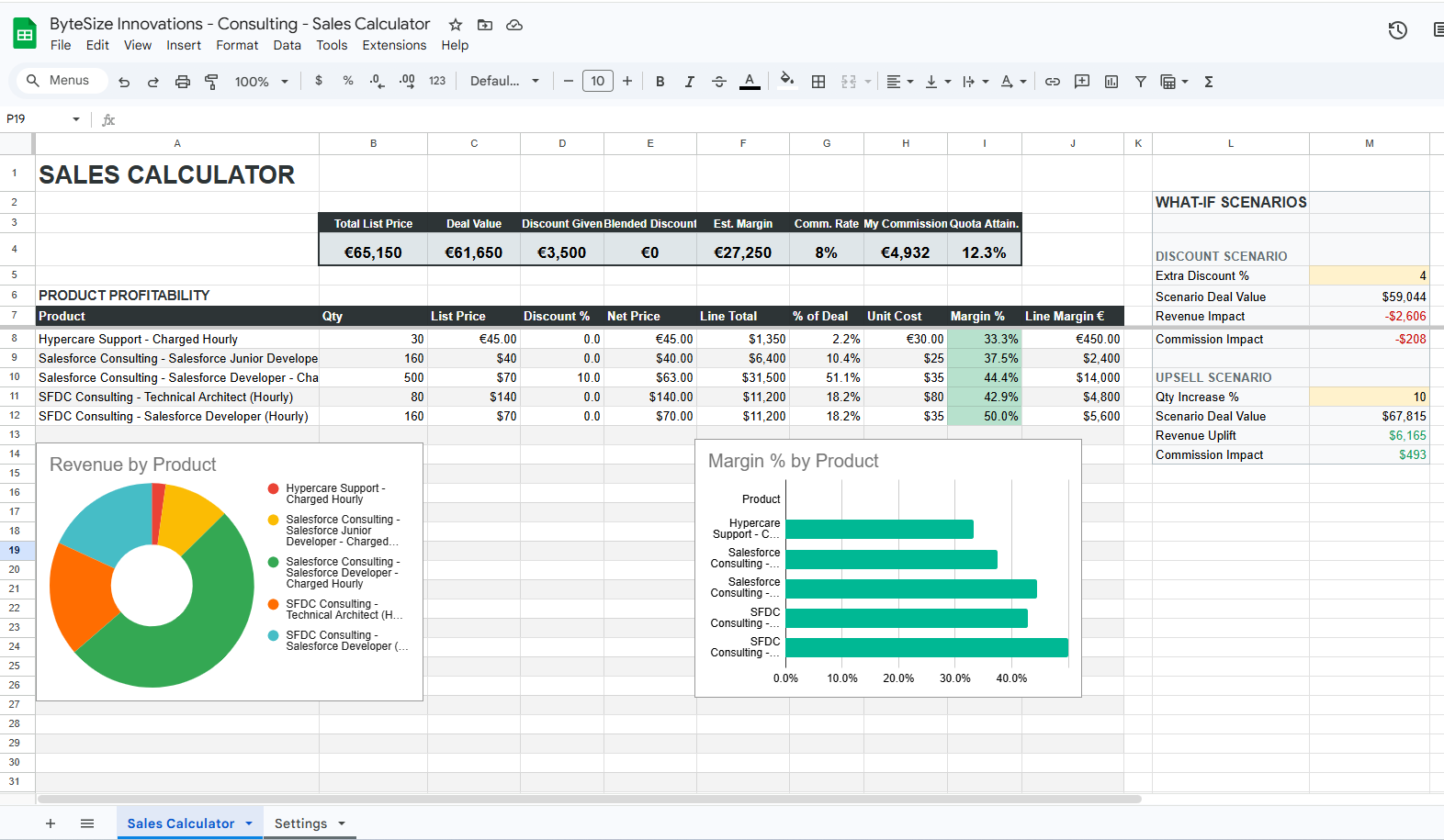
<p><img decoding="async" loading="lazy" alt="Sales Calculator spreadsheet" src="https://drivemate.forciit.com/assets/images/salesCalculatorSpreadsheetFullView-c5c775acbb31e10a6befee148726656f.png" width="1572" height="915" class="img_ev3q"></p>
<p>The end-to-end implementation of a sample use case is documented in <strong><a class="" href="https://drivemate.forciit.com/sheets/sales-calculator/sales-calculator-use-case">Record Sync Example - Sales Calculator</a></strong>.</p>
<p>Use a template-driven flow to generate a spreadsheet per business record and keep it in sync:</p>
<ol>
<li class="">Design a Google Sheets template with presentation sheets (for users) and a dedicated hidden data sheet (for Salesforce-managed sync data).</li>
<li class="">When a new parent record is created (for example, Opportunity), copy the template to the target Drive folder and store the copied spreadsheet ID on the Salesforce record.</li>
<li class="">On child-record creation events, append a new row into the hidden data sheet in the copied spreadsheet.</li>
<li class="">On child-record updates, edit matching rows in that same hidden data sheet using a stable key (for example, Salesforce record ID).</li>
<li class="">On child-record deletion, remove the matching rows from the hidden data sheet; formulas, dashboards, and charts on visible sheets recalculate automatically.</li>
</ol>
<p>This keeps Salesforce as the source of truth while preserving spreadsheet-native analytics and what-if modeling for end users.</p>
<h4 class="anchor anchorTargetStickyNavbar_Vzrq" id="documentation-reference">Documentation Reference<a href="https://drivemate.forciit.com/release-notes/4.0#documentation-reference" class="hash-link" aria-label="Direct link to Documentation Reference" title="Direct link to Documentation Reference" translate="no">​</a></h4>
<ul>
<li class=""><strong><a class="" href="https://drivemate.forciit.com/sheets">Google Sheets Integration Overview</a></strong></li>
<li class=""><strong><a class="" href="https://drivemate.forciit.com/sheets/automations">Sheets Automations Reference</a></strong></li>
<li class=""><strong><a class="" href="https://drivemate.forciit.com/sheets/sales-calculator/sales-calculator-use-case">Sales Calculator Record Sync Use Case</a></strong></li>
<li class=""><strong><a class="" href="https://drivemate.forciit.com/sheets/complex-spreadsheets">Complex Multi-Sheet Spreadsheets</a></strong></li>
</ul>
<h3 class="anchor anchorTargetStickyNavbar_Vzrq" id="additional-files--folders-management-actions">Additional Files &amp; Folders Management Actions<a href="https://drivemate.forciit.com/release-notes/4.0#additional-files--folders-management-actions" class="hash-link" aria-label="Direct link to Additional Files &amp; Folders Management Actions" title="Direct link to Additional Files &amp; Folders Management Actions" translate="no">​</a></h3>
<p>This release introduces additional actions for managing files and folders in Google Drive:</p>
<ul>
<li class=""><strong><a class="" href="https://drivemate.forciit.com/file-management/automations-overview#update-drive-item">Change File/Folder Metadata</a></strong>: update name, description, and starred state without manual Drive edits.</li>
<li class=""><strong><a class="" href="https://drivemate.forciit.com/file-management/automations-overview#copy-file">Copy File</a></strong>: create a copy of an existing Google Drive file in the same or a target folder.</li>
<li class=""><strong><a class="" href="https://drivemate.forciit.com/file-management/automations-overview#move-drive-item">Move File/Folder</a></strong>: move a file or folder to a different parent folder in Google Drive.</li>
<li class=""><strong><a class="" href="https://drivemate.forciit.com/file-management/automations-overview#delete-drive-item">Remove File/Folder</a></strong>: delete Google Drive files and folders directly from Flow or Apex automations.</li>
</ul>
<h2 class="anchor anchorTargetStickyNavbar_Vzrq" id="upgrade-required-actions">Upgrade Required Actions<a href="https://drivemate.forciit.com/release-notes/4.0#upgrade-required-actions" class="hash-link" aria-label="Direct link to Upgrade Required Actions" title="Direct link to Upgrade Required Actions" translate="no">​</a></h2>
<p><strong>If you upgrade from any <em>DriveMate</em> 3.X_ version</strong>, you need to follow a few post-installation steps to configure the new version properly.</p>
<div class="theme-admonition theme-admonition-note admonition_xJq3 alert alert--secondary"><div class="admonitionHeading_Gvgb"><span class="admonitionIcon_Rf37"><svg viewBox="0 0 14 16"><path fill-rule="evenodd" d="M6.3 5.69a.942.942 0 0 1-.28-.7c0-.28.09-.52.28-.7.19-.18.42-.28.7-.28.28 0 .52.09.7.28.18.19.28.42.28.7 0 .28-.09.52-.28.7a1 1 0 0 1-.7.3c-.28 0-.52-.11-.7-.3zM8 7.99c-.02-.25-.11-.48-.31-.69-.2-.19-.42-.3-.69-.31H6c-.27.02-.48.13-.69.31-.2.2-.3.44-.31.69h1v3c.02.27.11.5.31.69.2.2.42.31.69.31h1c.27 0 .48-.11.69-.31.2-.19.3-.42.31-.69H8V7.98v.01zM7 2.3c-3.14 0-5.7 2.54-5.7 5.68 0 3.14 2.56 5.7 5.7 5.7s5.7-2.55 5.7-5.7c0-3.15-2.56-5.69-5.7-5.69v.01zM7 .98c3.86 0 7 3.14 7 7s-3.14 7-7 7-7-3.12-7-7 3.14-7 7-7z"></path></svg></span>note</div><div class="admonitionContent_BuS1"><p>If you upgrade from <em>DriveMate 2.X</em> version, you need to additionally follow the steps for the <a class="" href="https://drivemate.forciit.com/release-notes/3.0#upgrade-required-actions"><em>DriveMate 3.0</em> release.</a></p></div></div>
<ol>
<li class="">
<p>Add <strong>Google Sheets API</strong> to the enabled APIs in your Google Cloud Console.</p>
<ol>
<li class="">Login to your <a href="https://console.cloud.google.com/" target="_blank" rel="noopener noreferrer" class="">Google Cloud Console</a> and select the DriveMate-related project configuration.</li>
<li class="">Select <em>APIs &amp; Services › Library</em> from the navigation menu and add search for <em>Google Sheets API</em>. Click on the API and select <em>Enable</em>.</li>
</ol>
</li>
<li class="">
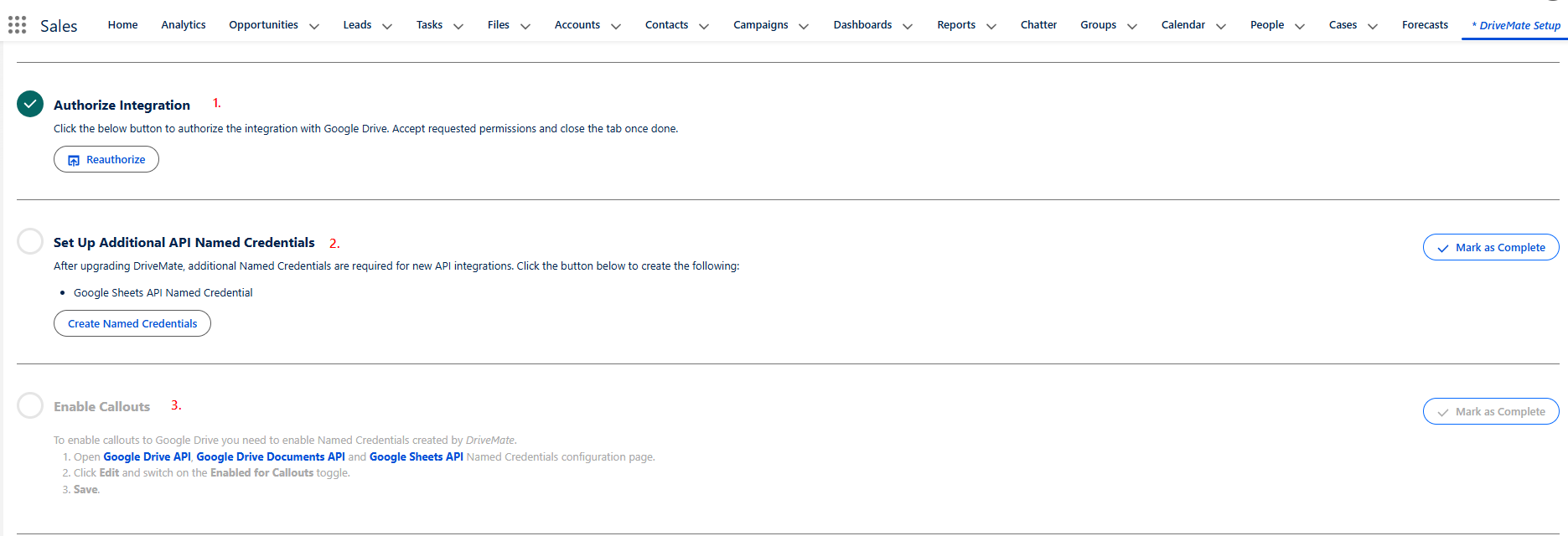
<p>Navigate to the <em>DriveMate Setup</em> page and execute the below manual steps:</p>
<ol>
<li class=""><strong><em>Authorize Integration</em></strong> - You need to reauthorize the integration to allow <em>DriveMate</em> to access <em>Google Documents API</em>.</li>
<li class=""><strong><em>Set Up Additional API Named Credentials</em></strong> - Use the button under this step to create a named credential metadata used to access the <em>Google Sheets API</em>.</li>
<li class=""><strong><em>Enable Callouts</em></strong> - Follow the instructions to activate the named credential created above.</li>
</ol>
<p><img decoding="async" loading="lazy" alt="DriveMate Setup - steps to execute with upgrade" src="https://drivemate.forciit.com/assets/images/setupPageManualSteps3.6-791818e064add91ea54379488c4c8e62.png" width="1871" height="640" class="img_ev3q"></p>
<div class="theme-admonition theme-admonition-note admonition_xJq3 alert alert--secondary"><div class="admonitionHeading_Gvgb"><span class="admonitionIcon_Rf37"><svg viewBox="0 0 14 16"><path fill-rule="evenodd" d="M6.3 5.69a.942.942 0 0 1-.28-.7c0-.28.09-.52.28-.7.19-.18.42-.28.7-.28.28 0 .52.09.7.28.18.19.28.42.28.7 0 .28-.09.52-.28.7a1 1 0 0 1-.7.3c-.28 0-.52-.11-.7-.3zM8 7.99c-.02-.25-.11-.48-.31-.69-.2-.19-.42-.3-.69-.31H6c-.27.02-.48.13-.69.31-.2.2-.3.44-.31.69h1v3c.02.27.11.5.31.69.2.2.42.31.69.31h1c.27 0 .48-.11.69-.31.2-.19.3-.42.31-.69H8V7.98v.01zM7 2.3c-3.14 0-5.7 2.54-5.7 5.68 0 3.14 2.56 5.7 5.7 5.7s5.7-2.55 5.7-5.7c0-3.15-2.56-5.69-5.7-5.69v.01zM7 .98c3.86 0 7 3.14 7 7s-3.14 7-7 7-7-3.12-7-7 3.14-7 7-7z"></path></svg></span>note</div><div class="admonitionContent_BuS1"><p>If you do not see these manual steps on the setup page, clear your browser cache and refresh the page.</p></div></div>
</li>
</ol>]]></content>
        <category label="release" term="release"/>
        <category label="DriveMate 4.0" term="DriveMate 4.0"/>
        <category label="sheets integration" term="sheets integration"/>
        <category label="sheets actions" term="sheets actions"/>
        <category label="sheets generation" term="sheets generation"/>
    </entry>
    <entry>
        <title type="html"><![CDATA[DriveMate 3.0]]></title>
        <id>https://drivemate.forciit.com/release-notes/3.0</id>
        <link href="https://drivemate.forciit.com/release-notes/3.0"/>
        <updated>2025-11-17T00:00:00.000Z</updated>
        <summary type="html"><![CDATA[DriveMate 3.0 Release Notes]]></summary>
        <content type="html"><![CDATA[<h2 class="anchor anchorTargetStickyNavbar_Vzrq" id="new-features">New Features<a href="https://drivemate.forciit.com/release-notes/3.0#new-features" class="hash-link" aria-label="Direct link to New Features" title="Direct link to New Features" translate="no">​</a></h2>
<h3 class="anchor anchorTargetStickyNavbar_Vzrq" id="document-generation">Document Generation<a href="https://drivemate.forciit.com/release-notes/3.0#document-generation" class="hash-link" aria-label="Direct link to Document Generation" title="Direct link to Document Generation" translate="no">​</a></h3>
<p>The <em>DriveMate 3.0</em> release introduces the whole new module of the app - <strong><a class="" href="https://drivemate.forciit.com/document-generation">document generation</a></strong>.
Now <em>DriveMate</em> allows you to generate documents based on the templates stored in Google Drive.</p>
<h4 class="anchor anchorTargetStickyNavbar_Vzrq" id="how-does-it-work">How does it work?<a href="https://drivemate.forciit.com/release-notes/3.0#how-does-it-work" class="hash-link" aria-label="Direct link to How does it work?" title="Direct link to How does it work?" translate="no">​</a></h4>
<ol>
<li class="">First, you define a <em>document template</em> and save it as a Google Doc in your Google Drive. A <em>document template</em> is just your document with placeholders for context-specific data - such as a contract with no customer-specific information prepopulated - those information will be filled during the automatic document generation process.</li>
<li class="">Next, you invoke <em>DriveMate</em> document generation from an appropriate place in your business process. Usually, this is a screen flow executed from the level of a record page (via a quick action) or your own trigger logic.</li>
<li class="">Voilà, your document creation process is automated.</li>
</ol>
<p><img decoding="async" loading="lazy" alt="Sample Document Template - Partnership Agreement - Page 1" src="https://drivemate.forciit.com/assets/images/partnershipAgreementExample1-8439bc5b60b12ee45dd99513a1678ba6.png" width="1850" height="904" class="img_ev3q"></p>
<p><img decoding="async" loading="lazy" alt="Sample Document Template - Partnership Agreement - Page 2" src="https://drivemate.forciit.com/assets/images/partnershipAgreementExample2-47563d3a60372d0734b6cda4827b744a.png" width="1839" height="860" class="img_ev3q"></p>
<h2 class="anchor anchorTargetStickyNavbar_Vzrq" id="upgrade-required-actions">Upgrade Required Actions<a href="https://drivemate.forciit.com/release-notes/3.0#upgrade-required-actions" class="hash-link" aria-label="Direct link to Upgrade Required Actions" title="Direct link to Upgrade Required Actions" translate="no">​</a></h2>
<p><strong>If you upgrade from any <em>DriveMate 2.X</em> version</strong>, you need to follow a few post-installation steps to configure the new version properly.</p>
<ol>
<li class="">
<p>Add <strong>Google Docs API</strong> to the enabled APIs in your Google Cloud Console.</p>
<ol>
<li class="">Login to your <a href="https://console.cloud.google.com/" target="_blank" rel="noopener noreferrer" class="">Google Cloud Console</a> and select the DriveMate-related project configuration.</li>
<li class="">Select <em>APIs &amp; Services › Library</em> from the navigation menu and search for <em>Google Docs API</em>. Click on the API and select <em>Enable</em>.</li>
</ol>
</li>
<li class="">
<p>Navigate to the <em>DriveMate Setup</em> page and execute the below manual steps:</p>
<ol>
<li class=""><strong><em>Authorize Integration</em></strong> - You need to reauthorize the integration to allow <em>DriveMate</em> to access <em>Google Documents API</em>.</li>
<li class=""><strong><em>Create Documents API Named Credential</em></strong> - Use the button under this step to create a named credential metadata used to access the <em>Google Documents API</em>.</li>
<li class=""><strong><em>Enable Callouts</em></strong> - Follow the instructions to activate the named credential created above.</li>
</ol>
<p><img decoding="async" loading="lazy" alt="DriveMate Setup - steps to execute with upgrade" src="https://drivemate.forciit.com/assets/images/setupPageManualSteps3.0-11fb800f8c0428c99b20d7372375a2db.png" width="1876" height="658" class="img_ev3q"></p>
</li>
</ol>]]></content>
        <category label="release" term="release"/>
        <category label="DriveMate 3.0" term="DriveMate 3.0"/>
        <category label="document generation" term="document generation"/>
    </entry>
    <entry>
        <title type="html"><![CDATA[DriveMate 2.11]]></title>
        <id>https://drivemate.forciit.com/release-notes/2.11</id>
        <link href="https://drivemate.forciit.com/release-notes/2.11"/>
        <updated>2025-08-01T00:00:00.000Z</updated>
        <summary type="html"><![CDATA[DriveMate 2.11 Release Notes]]></summary>
        <content type="html"><![CDATA[<h2 class="anchor anchorTargetStickyNavbar_Vzrq" id="new-features">New Features<a href="https://drivemate.forciit.com/release-notes/2.11#new-features" class="hash-link" aria-label="Direct link to New Features" title="Direct link to New Features" translate="no">​</a></h2>
<h3 class="anchor anchorTargetStickyNavbar_Vzrq" id="gdrive-files-drag--drop">GDrive Files Drag &amp; Drop<a href="https://drivemate.forciit.com/release-notes/2.11#gdrive-files-drag--drop" class="hash-link" aria-label="Direct link to GDrive Files Drag &amp; Drop" title="Direct link to GDrive Files Drag &amp; Drop" translate="no">​</a></h3>
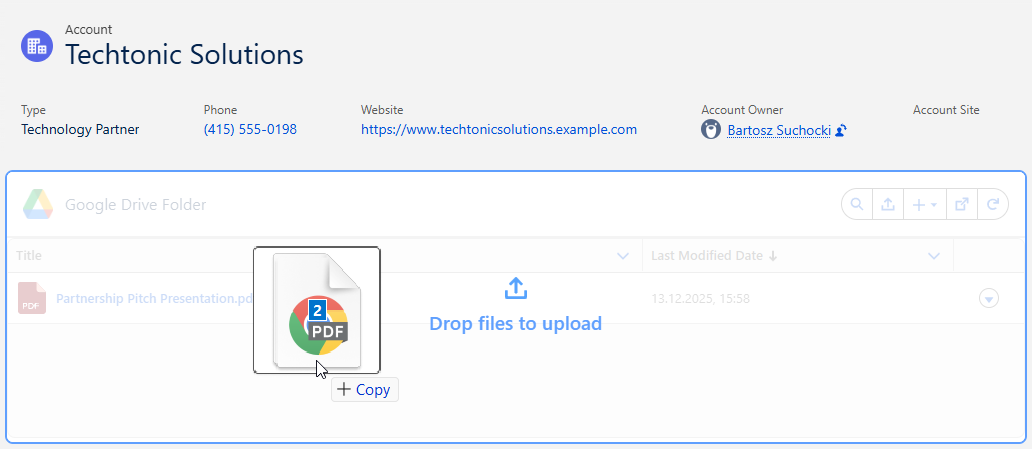
<p>It is now possible to upload files to Google Drive by drag &amp; drop to the main DriveMate component.</p>
<p><img decoding="async" loading="lazy" alt="GDrive files drag &amp;amp; drop" src="https://drivemate.forciit.com/assets/images/drag&amp;drop-2edc5dc064397cc9df0aa465aae792aa.png" width="1032" height="449" class="img_ev3q"></p>]]></content>
        <category label="release" term="release"/>
        <category label="DriveMate 2.11" term="DriveMate 2.11"/>
        <category label="file management" term="file management"/>
        <category label="drag and drop file upload" term="drag and drop file upload"/>
    </entry>
    <entry>
        <title type="html"><![CDATA[DriveMate 2.8]]></title>
        <id>https://drivemate.forciit.com/release-notes/2.8</id>
        <link href="https://drivemate.forciit.com/release-notes/2.8"/>
        <updated>2025-04-10T00:00:00.000Z</updated>
        <summary type="html"><![CDATA[DriveMate 2.8 Release Notes]]></summary>
        <content type="html"><![CDATA[<h2 class="anchor anchorTargetStickyNavbar_Vzrq" id="new-features">New Features<a href="https://drivemate.forciit.com/release-notes/2.8#new-features" class="hash-link" aria-label="Direct link to New Features" title="Direct link to New Features" translate="no">​</a></h2>
<h3 class="anchor anchorTargetStickyNavbar_Vzrq" id="google-workspace-files-creation---docs-sheets-slides-forms">Google Workspace Files Creation - Docs, Sheets, Slides, Forms<a href="https://drivemate.forciit.com/release-notes/2.8#google-workspace-files-creation---docs-sheets-slides-forms" class="hash-link" aria-label="Direct link to Google Workspace Files Creation - Docs, Sheets, Slides, Forms" title="Direct link to Google Workspace Files Creation - Docs, Sheets, Slides, Forms" translate="no">​</a></h3>
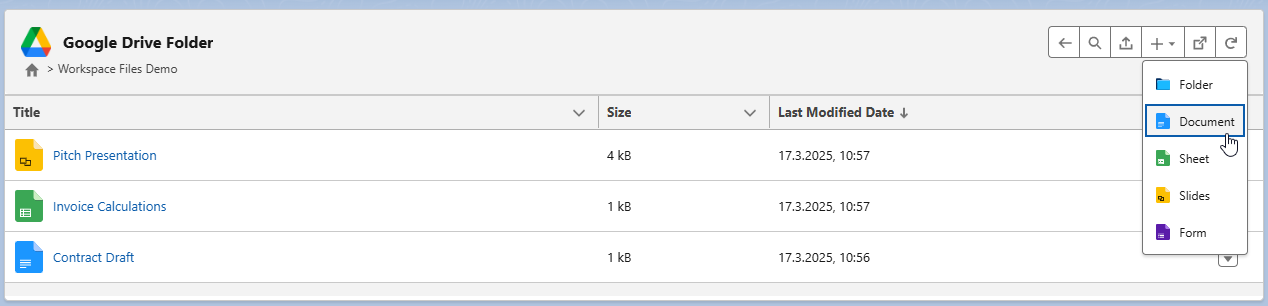
<p>It is now possible to create Google Docs, Sheets, Slides, and Forms from the level of the main DriveMate component.</p>
<p><img decoding="async" loading="lazy" alt="Workspace files creation" src="https://drivemate.forciit.com/assets/images/workspaceFilesCreation-1d40420923b3b92cd1d708d37f910438.png" width="1268" height="306" class="img_ev3q"></p>
<h3 class="anchor anchorTargetStickyNavbar_Vzrq" id="upload-component-for-flows">Upload Component for Flows<a href="https://drivemate.forciit.com/release-notes/2.8#upload-component-for-flows" class="hash-link" aria-label="Direct link to Upload Component for Flows" title="Direct link to Upload Component for Flows" translate="no">​</a></h3>
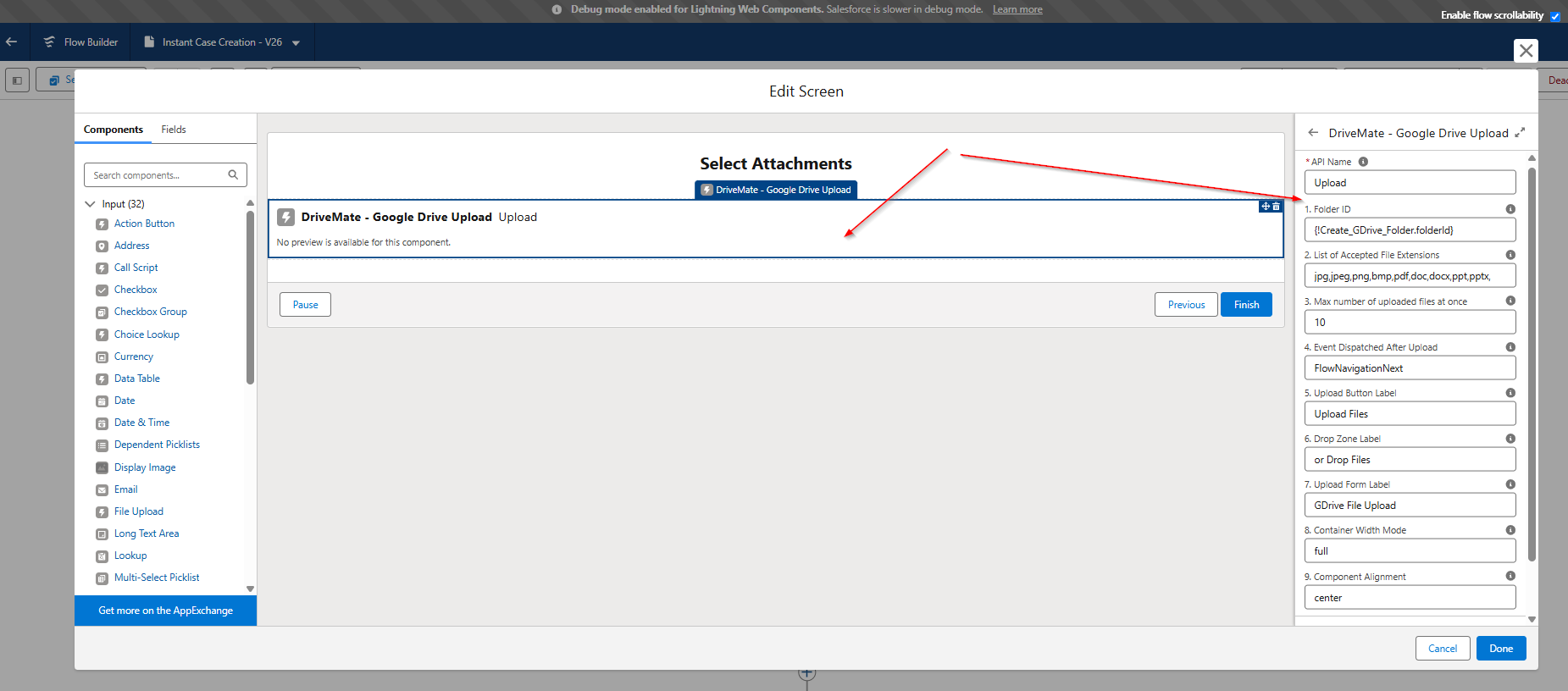
<p>A new upload-only component has been added, which allows admins to add the Google Drive upload functionality to the screen flows (or use it in custom LWC components), effectively enabling the use of the upload in flows, the lightning app builder, quick actions, and communities.</p>
<h4 class="anchor anchorTargetStickyNavbar_Vzrq" id="example-use-case---case-creation-flow">Example Use Case - Case Creation Flow<a href="https://drivemate.forciit.com/release-notes/2.8#example-use-case---case-creation-flow" class="hash-link" aria-label="Direct link to Example Use Case - Case Creation Flow" title="Direct link to Example Use Case - Case Creation Flow" translate="no">​</a></h4>
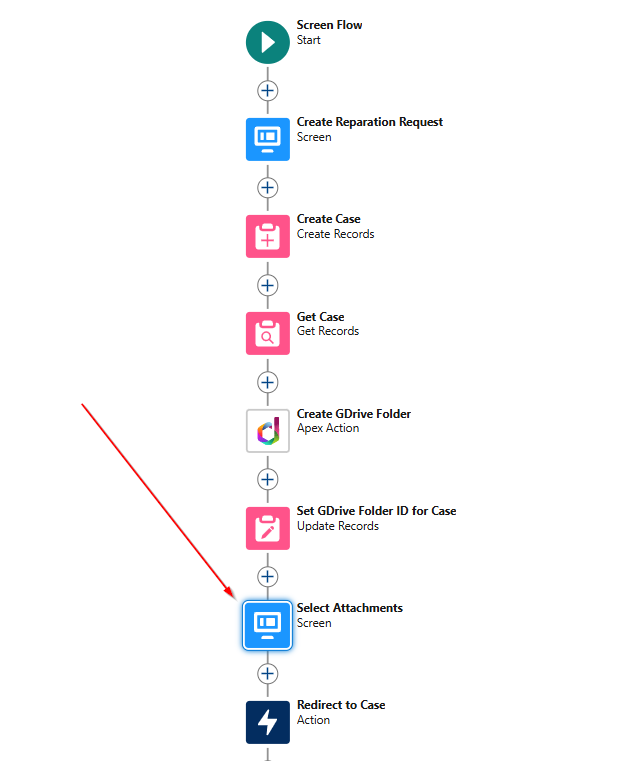
<p>One of the applicable scenarios is a multi-step flow for the case creation process.</p>
<ol>
<li class="">
<p>In the first step, we create a screen flow.</p>
<p><img decoding="async" loading="lazy" alt="Upload Component for Flows - Flow Example" src="https://drivemate.forciit.com/assets/images/uploadComponentForFlowsFlowExample-b0df94e3053f819fbdb3427c07e9185b.png" width="622" height="761" class="img_ev3q"></p>
</li>
<li class="">
<p>Use the <em>DriveMate - Google Drive Upload</em> component on the screen used to submit case attachments (the attachments will be uploaded to Google Drive).</p>
<p><img decoding="async" loading="lazy" alt="Upload component configuration" src="https://drivemate.forciit.com/assets/images/uploadComponentConfig-24133f73973ee21fd08c5927eb368305.png" width="1851" height="816" class="img_ev3q"></p>
</li>
<li class="">
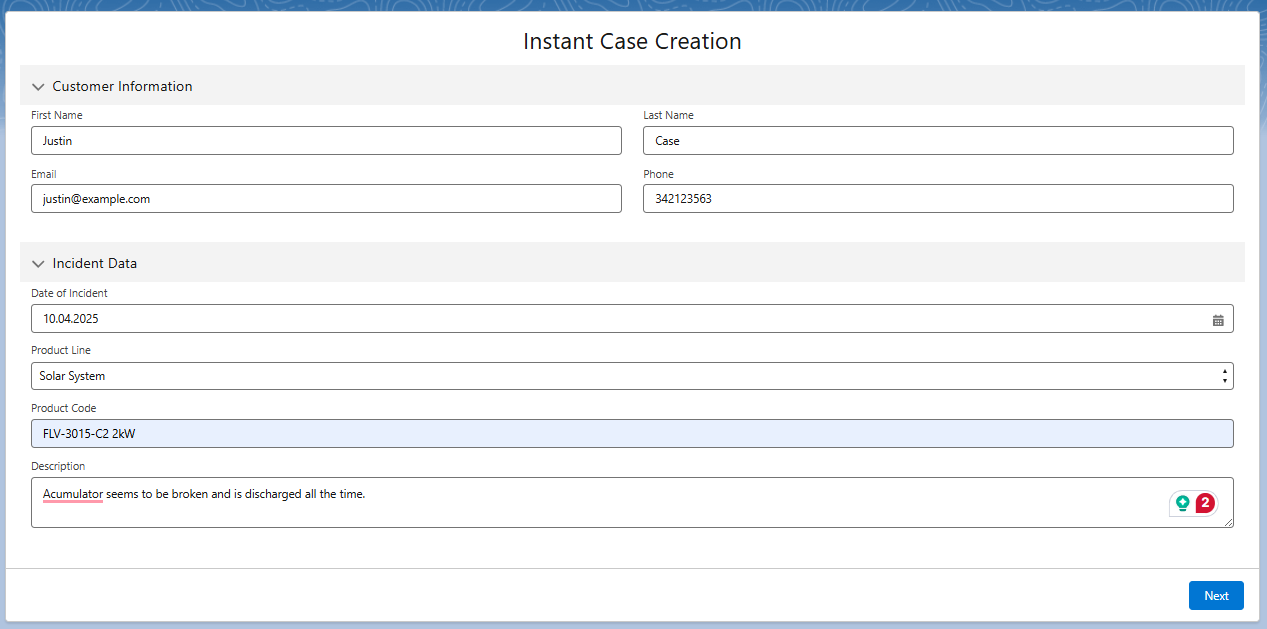
<p>The running flow might look like this:</p>
<p><img decoding="async" loading="lazy" alt="Upload component use case" src="https://drivemate.forciit.com/assets/images/uploadComponentUseCaseGeneralView-a3baaefde6d4e0aa503119c49f3215b7.png" width="1267" height="629" class="img_ev3q"></p>
</li>
<li class="">
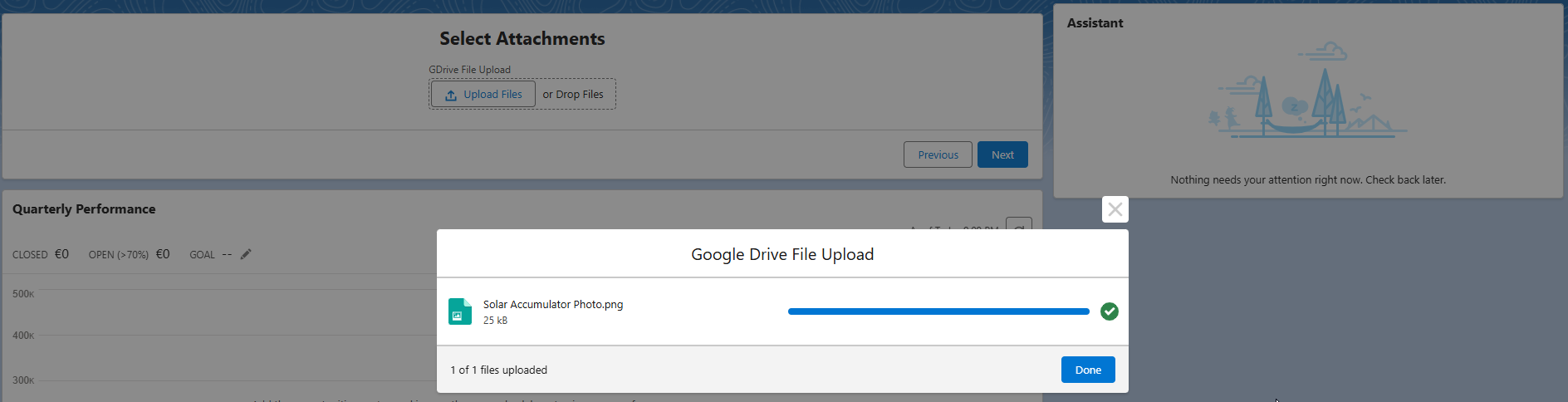
<p>Here's where the component is used and attachments are submitted to Google Drive.</p>
<p><img decoding="async" loading="lazy" alt="Upload component view" src="https://drivemate.forciit.com/assets/images/uploadComponentView-3d53945c156c372c996773bc0d2dd2ab.png" width="1263" height="192" class="img_ev3q"></p>
<p><img decoding="async" loading="lazy" alt="Upload component modal" src="https://drivemate.forciit.com/assets/images/uploadComponentModal-df26f8caa41b6f3f60003692fd07f602.png" width="1888" height="484" class="img_ev3q"></p>
</li>
<li class="">
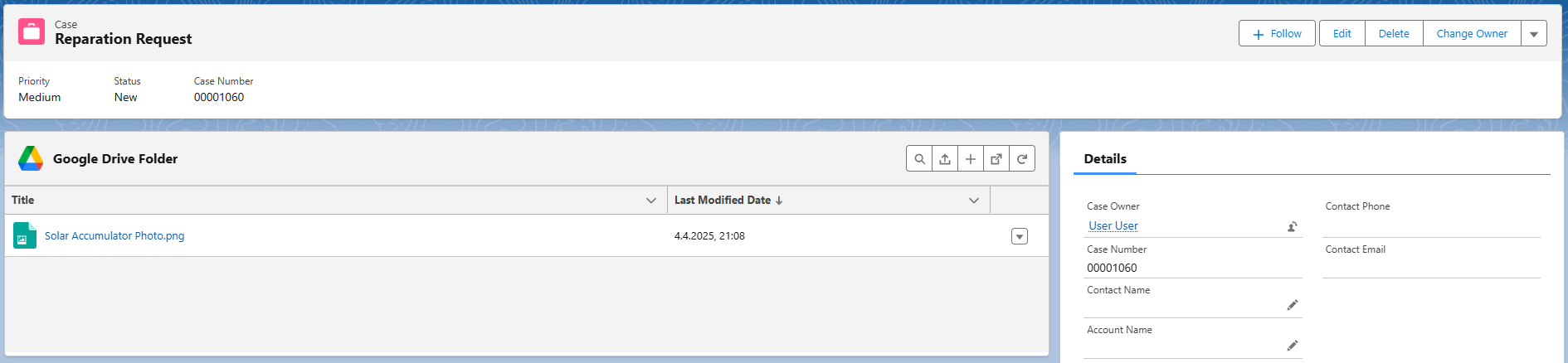
<p>In the last step, user is redirected to the newly created Case record.</p>
<p><img decoding="async" loading="lazy" alt="Upload component use case record view" src="https://drivemate.forciit.com/assets/images/uploadComponentUseCaseRecordPage-bddccbaa3534869f6d8f455a97e69963.png" width="1890" height="438" class="img_ev3q"></p>
</li>
</ol>
<h3 class="anchor anchorTargetStickyNavbar_Vzrq" id="improved-folder-creation-ui">Improved Folder Creation UI<a href="https://drivemate.forciit.com/release-notes/2.8#improved-folder-creation-ui" class="hash-link" aria-label="Direct link to Improved Folder Creation UI" title="Direct link to Improved Folder Creation UI" translate="no">​</a></h3>
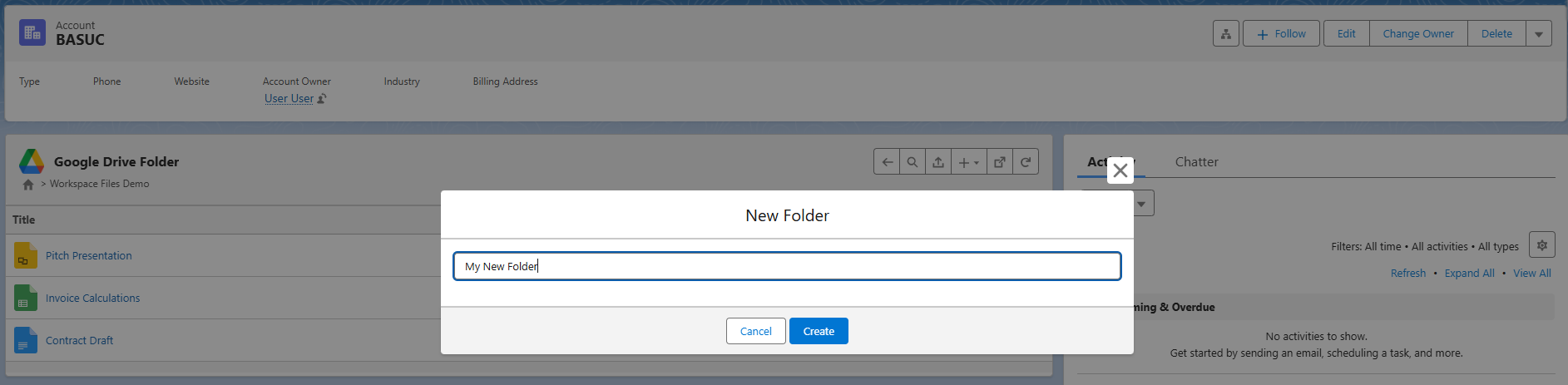
<p>The legacy navigation-inline folder creation UI has been replaced with a dedicated modal for a better user experience.</p>
<p><img decoding="async" loading="lazy" alt="Folder creation modal" src="https://drivemate.forciit.com/assets/images/folderCreationModal-b982cf09d2d4dce0d22da6a40f59460c.png" width="1885" height="463" class="img_ev3q"></p>
<h3 class="anchor anchorTargetStickyNavbar_Vzrq" id="slds2-theme-support">SLDS2 Theme Support<a href="https://drivemate.forciit.com/release-notes/2.8#slds2-theme-support" class="hash-link" aria-label="Direct link to SLDS2 Theme Support" title="Direct link to SLDS2 Theme Support" translate="no">​</a></h3>
<p>DriveMate UI components have now been adjusted to work well with the new SLDS2 Salesforce themes. Here's how the UI looks like then the new theme is enabled on the org:</p>
<p><img decoding="async" loading="lazy" alt="SLDS2 theme support" src="https://drivemate.forciit.com/assets/images/slds2ThemeSupport-bb324452755a3791996c3c4e58365b92.png" width="1886" height="637" class="img_ev3q"></p>
<h2 class="anchor anchorTargetStickyNavbar_Vzrq" id="bug-fixes">Bug Fixes<a href="https://drivemate.forciit.com/release-notes/2.8#bug-fixes" class="hash-link" aria-label="Direct link to Bug Fixes" title="Direct link to Bug Fixes" translate="no">​</a></h2>
<ul>
<li class="">Search mode clear after selecting folder during search</li>
<li class="">Improved styling when the Drivemate Google Drive Folder component is placed inside of the tabset</li>
</ul>]]></content>
        <category label="release" term="release"/>
        <category label="DriveMate 2.8" term="DriveMate 2.8"/>
        <category label="file management" term="file management"/>
        <category label="workspace files creation" term="workspace files creation"/>
        <category label="upload component for flows" term="upload component for flows"/>
        <category label="screen flows integration" term="screen flows integration"/>
        <category label="SLDS2 theme" term="SLDS2 theme"/>
    </entry>
    <entry>
        <title type="html"><![CDATA[DriveMate 2.6]]></title>
        <id>https://drivemate.forciit.com/release-notes/2.6</id>
        <link href="https://drivemate.forciit.com/release-notes/2.6"/>
        <updated>2025-03-01T00:00:00.000Z</updated>
        <summary type="html"><![CDATA[DriveMate 2.6 Release Notes]]></summary>
        <content type="html"><![CDATA[<h2 class="anchor anchorTargetStickyNavbar_Vzrq" id="new-features">New Features<a href="https://drivemate.forciit.com/release-notes/2.6#new-features" class="hash-link" aria-label="Direct link to New Features" title="Direct link to New Features" translate="no">​</a></h2>
<h2 class="anchor anchorTargetStickyNavbar_Vzrq" id="drivemate-component-auto-refresh-mechanism">DriveMate Component Auto-Refresh Mechanism<a href="https://drivemate.forciit.com/release-notes/2.6#drivemate-component-auto-refresh-mechanism" class="hash-link" aria-label="Direct link to DriveMate Component Auto-Refresh Mechanism" title="Direct link to DriveMate Component Auto-Refresh Mechanism" translate="no">​</a></h2>
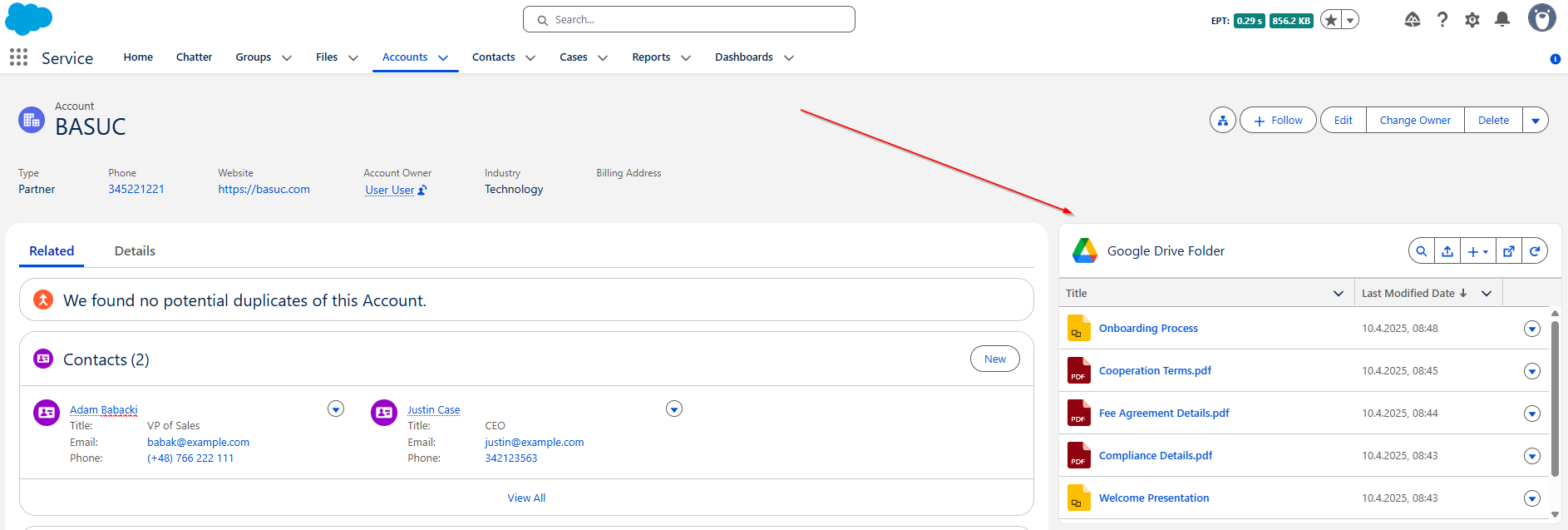
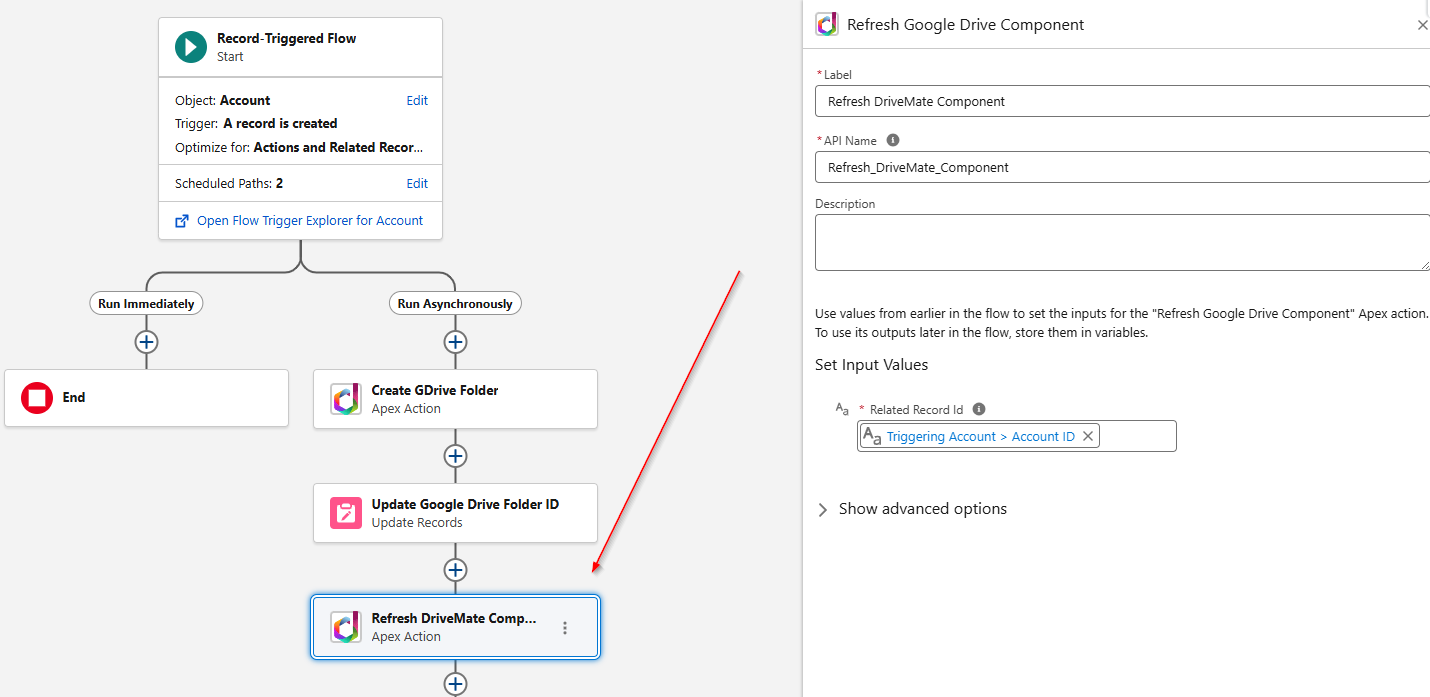
<p>A new Apex Action has been added that allows publishing a "refresh needed" event to refresh the component after changes to GDrive were done asynchronously.</p>
<p>It is especially useful to use it in a flow that auto-creates a folder in Google Drive for the specific record and assigns a folder ID to this record.</p>
<p>By using the <strong>Refresh DriveMate Component</strong> Apex Action, the flow triggers the component refresh after the folder ID assignment. As a result, users don't need to refresh the page to see the appropriate Google Drive folder displayed in the component.</p>
<p><img decoding="async" loading="lazy" alt="DriveMate Component Refresh Action" src="https://drivemate.forciit.com/assets/images/componentRefreshAction-96d5d25e063813fd64138a3af50a8b17.png" width="1430" height="697" class="img_ev3q"></p>
<h2 class="anchor anchorTargetStickyNavbar_Vzrq" id="simplified-apex-actions">Simplified Apex Actions<a href="https://drivemate.forciit.com/release-notes/2.6#simplified-apex-actions" class="hash-link" aria-label="Direct link to Simplified Apex Actions" title="Direct link to Simplified Apex Actions" translate="no">​</a></h2>
<p>Each of the existing DriveMate Apex Actions now has its new equivalent with a simplified response structure. Thanks to that, there is no longer a need to iterate over unnecessary loops in flows that use DriveMate Apex Actions.</p>
<p>Here are the old actions with their new simplified equivalents:</p>
<ul>
<li class=""><code>Upload a file</code> -&gt; <code>Upload a file - Simple Response Structure</code></li>
<li class=""><code>Create folder</code> -&gt; <code>Create folder - Simple Response Structure</code></li>
<li class=""><code>Search Files by Name</code> -&gt; <code>Search Files by Name - Simple Response Structure</code></li>
<li class=""><code>Search Folders by Name</code>-&gt; <code>Search Folders by Name - Simple Response Structure</code></li>
</ul>
<h2 class="anchor anchorTargetStickyNavbar_Vzrq" id="simplified-packaged-autolaunched-flows---search-files-and-search-folders">Simplified Packaged Autolaunched Flows - Search Files and Search Folders<a href="https://drivemate.forciit.com/release-notes/2.6#simplified-packaged-autolaunched-flows---search-files-and-search-folders" class="hash-link" aria-label="Direct link to Simplified Packaged Autolaunched Flows - Search Files and Search Folders" title="Direct link to Simplified Packaged Autolaunched Flows - Search Files and Search Folders" translate="no">​</a></h2>
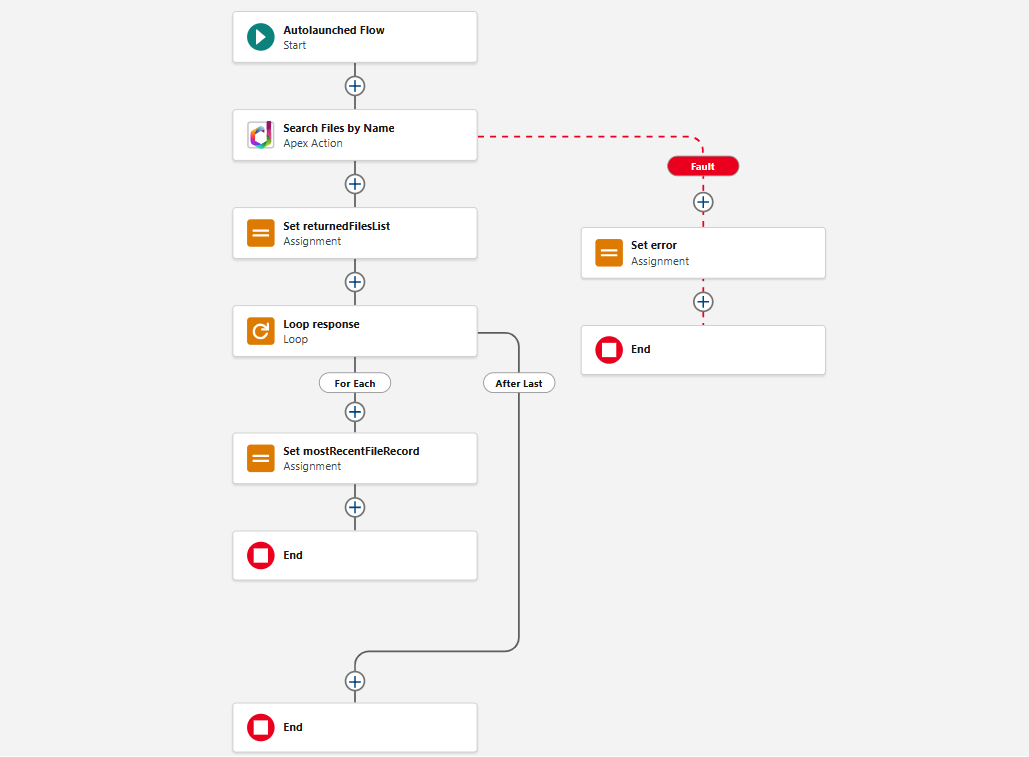
<p>The packaged autolaunched flows are now using the simplified apex actions versions. Thanks to that, their internal logic is simplified.
From the end-user perspective, their behavior is the same.</p>
<p><img decoding="async" loading="lazy" alt="Search Files flow" src="https://drivemate.forciit.com/assets/images/searchFilesFlow-dda8e99615a00be97a8c35a7f4139339.png" width="1029" height="757" class="img_ev3q"></p>]]></content>
        <category label="release" term="release"/>
        <category label="DriveMate 2.6" term="DriveMate 2.6"/>
        <category label="file management" term="file management"/>
        <category label="Google Drive Folder component auto-refresh" term="Google Drive Folder component auto-refresh"/>
        <category label="automatic folder assignment" term="automatic folder assignment"/>
        <category label="apex actions" term="apex actions"/>
    </entry>
    <entry>
        <title type="html"><![CDATA[DriveMate 2.5]]></title>
        <id>https://drivemate.forciit.com/release-notes/2.5</id>
        <link href="https://drivemate.forciit.com/release-notes/2.5"/>
        <updated>2025-02-21T00:00:00.000Z</updated>
        <summary type="html"><![CDATA[DriveMate 2.5 Release Notes]]></summary>
        <content type="html"><![CDATA[<h2 class="anchor anchorTargetStickyNavbar_Vzrq" id="new-features">New Features<a href="https://drivemate.forciit.com/release-notes/2.5#new-features" class="hash-link" aria-label="Direct link to New Features" title="Direct link to New Features" translate="no">​</a></h2>
<h3 class="anchor anchorTargetStickyNavbar_Vzrq" id="per-user-integration-mode">Per User Integration Mode<a href="https://drivemate.forciit.com/release-notes/2.5#per-user-integration-mode" class="hash-link" aria-label="Direct link to Per User Integration Mode" title="Direct link to Per User Integration Mode" translate="no">​</a></h3>
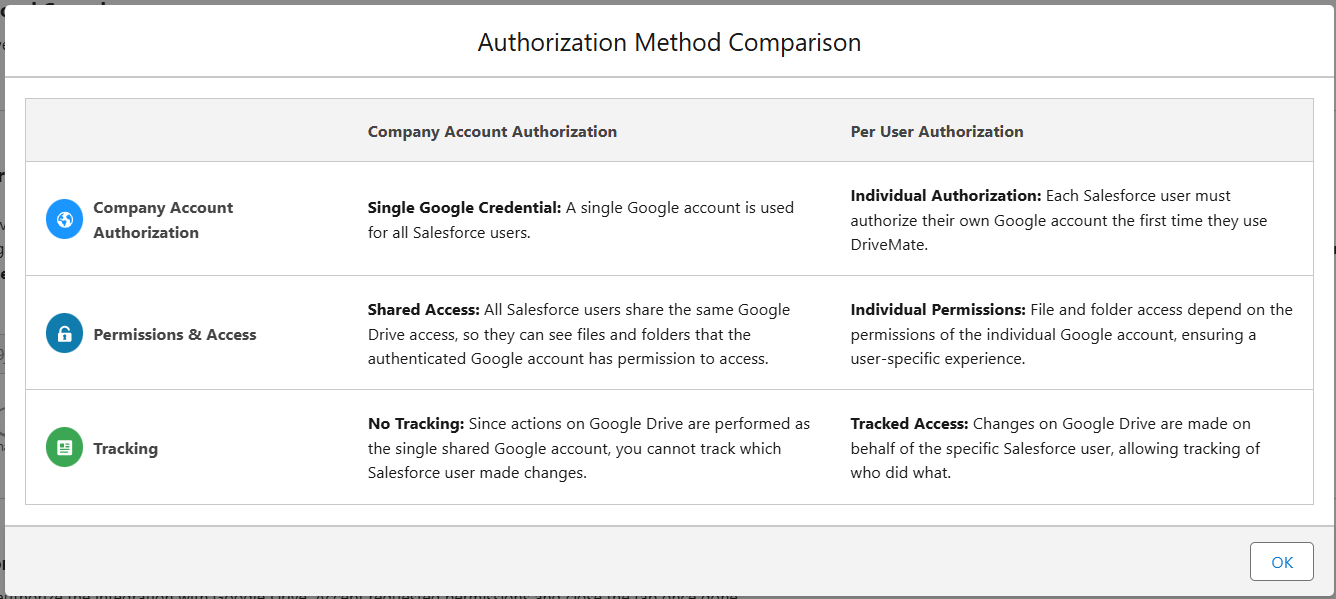
<p>Ability to switch between <em>per-user</em> and <em>per-org</em> integration modes.
Now, admins can decide whether the operations on Google Drive will be performed in the context of the whole organization account, or the context of each user.</p>
<p><img decoding="async" loading="lazy" alt="Authorization modes comparison" src="https://drivemate.forciit.com/assets/images/authorizationModeComparison-72b763639076992f46ba36dd4b174205.png" width="1336" height="599" class="img_ev3q"></p>
<p><img decoding="async" loading="lazy" alt="Authorization mode change modal" src="https://drivemate.forciit.com/assets/images/authorizationModeChangeModal-b51a58fa886ea7965faa9e3443addf02.png" width="1600" height="318" class="img_ev3q"></p>
<h3 class="anchor anchorTargetStickyNavbar_Vzrq" id="setup-page-for-app-configuration">Setup Page for App Configuration<a href="https://drivemate.forciit.com/release-notes/2.5#setup-page-for-app-configuration" class="hash-link" aria-label="Direct link to Setup Page for App Configuration" title="Direct link to Setup Page for App Configuration" translate="no">​</a></h3>
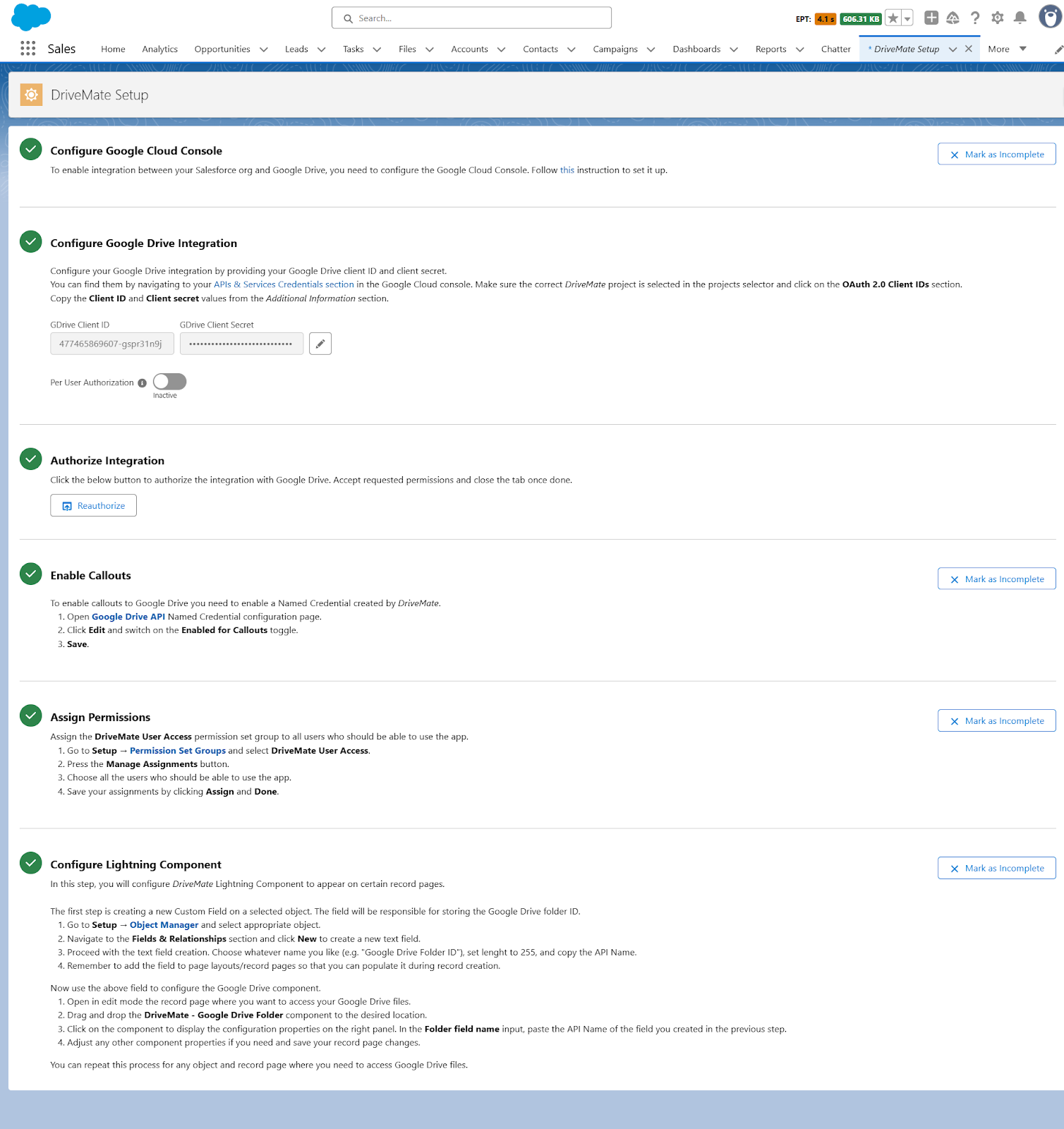
<p>Setup page containing instructions for post-installation steps needed to configure the app.</p>
<p>It contains:</p>
<ul>
<li class="">Steps completion tracking</li>
<li class="">Interactive links to Salesforce Setup Pages - to speed up the manual steps completion</li>
<li class="">Integration metadata creation automation</li>
<li class="">Ability to change integration credentials (client ID and client secret from Google Console app definition)</li>
<li class="">Ability to switch between per-org and per-user integration mode</li>
<li class="">Comparison table between authorization modes</li>
</ul>
<p><img decoding="async" loading="lazy" alt="Setup page" src="https://drivemate.forciit.com/assets/images/initialSetupPageView-562954e1ebbf55cf896b124ed169b26f.png" width="1508" height="1600" class="img_ev3q"></p>
<h3 class="anchor anchorTargetStickyNavbar_Vzrq" id="removed-file-size-limit-for-component-upload">Removed File Size Limit for Component Upload<a href="https://drivemate.forciit.com/release-notes/2.5#removed-file-size-limit-for-component-upload" class="hash-link" aria-label="Direct link to Removed File Size Limit for Component Upload" title="Direct link to Removed File Size Limit for Component Upload" translate="no">​</a></h3>
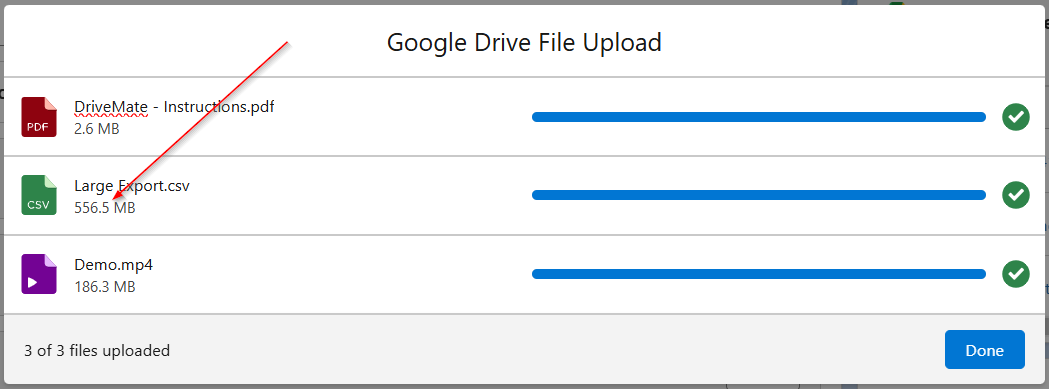
<p>Previously, the maximum size of the file uploaded via the DriveMate component was 33Mb and it required additional configuration. All files larger than 6MB were uploaded asynchronously.</p>
<p>Now, the upload has been updated and there is <strong>no limit for the file size</strong> and upload is done synchronously regardless of the size.</p>
<p>Additionally, file uploads can be now canceled individually.</p>
<p><img decoding="async" loading="lazy" alt="File upload modal" src="https://drivemate.forciit.com/assets/images/fileUploadModalWithSizes-5e4a712da6d2532f825201c7ead73651.png" width="1049" height="389" class="img_ev3q"></p>
<h3 class="anchor anchorTargetStickyNavbar_Vzrq" id="drivemate-component-redesign-and-improvements">DriveMate Component Redesign and Improvements<a href="https://drivemate.forciit.com/release-notes/2.5#drivemate-component-redesign-and-improvements" class="hash-link" aria-label="Direct link to DriveMate Component Redesign and Improvements" title="Direct link to DriveMate Component Redesign and Improvements" translate="no">​</a></h3>
<h4 class="anchor anchorTargetStickyNavbar_Vzrq" id="configurable-columns">Configurable Columns<a href="https://drivemate.forciit.com/release-notes/2.5#configurable-columns" class="hash-link" aria-label="Direct link to Configurable Columns" title="Direct link to Configurable Columns" translate="no">​</a></h4>
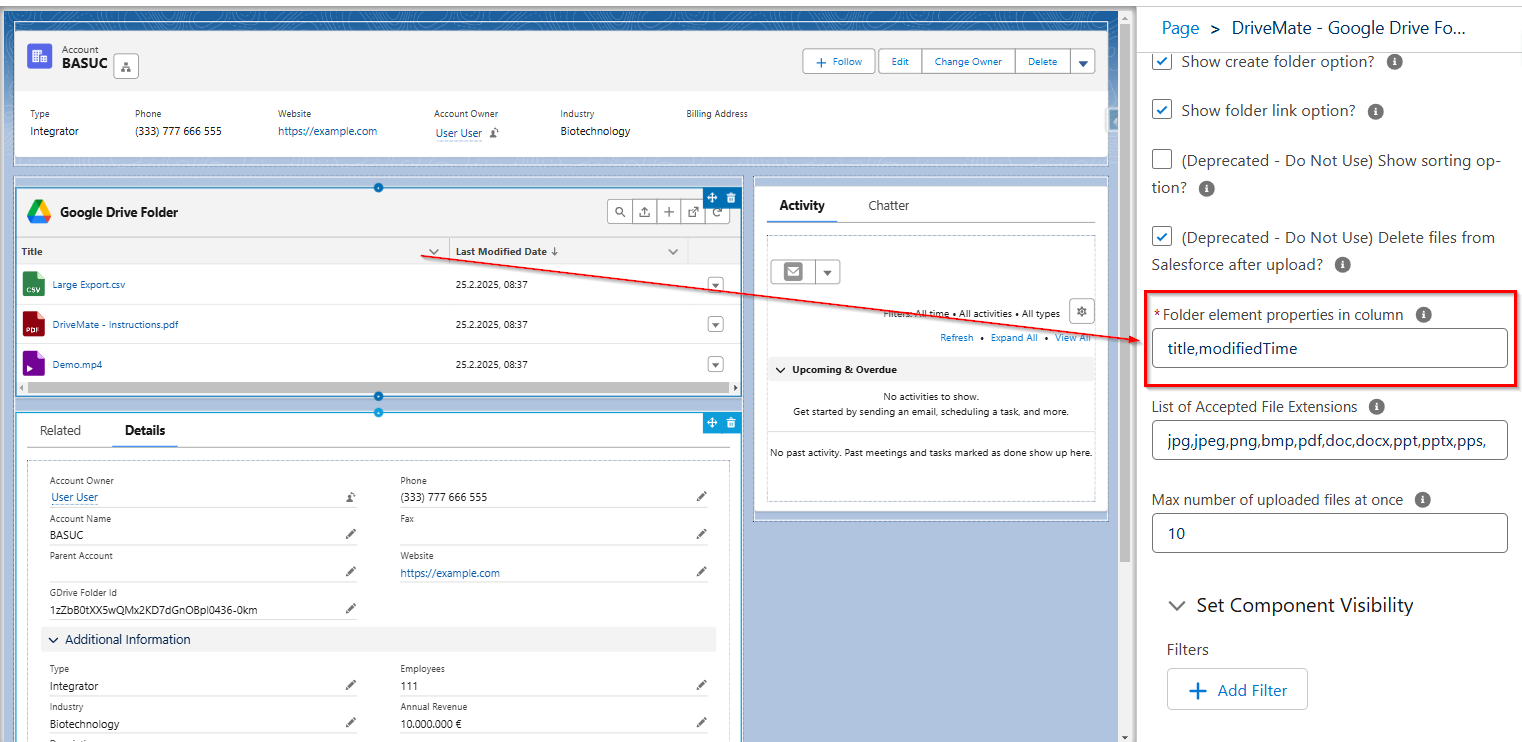
<p>Admins can now specify the columns that will be displayed on the DriveMate component by modifying the <code>Folder element properties in columns</code> component attribute.</p>
<p>Supported columns:</p>
<ul>
<li class=""><em>title</em> - file/folder name
modifiedTime - last modified date</li>
<li class="">size - file/folder size</li>
<li class=""><em>createdTime</em> - creation date</li>
<li class=""><em>fileExtension</em> - file extension</li>
<li class=""><em>mimeType</em> - mime type</li>
</ul>
<p><img decoding="async" loading="lazy" alt="DriveMate component columns configuration" src="https://drivemate.forciit.com/assets/images/columnsConfiguration-d5db724dcf94e9f9511d8345632968d5.png" width="1522" height="742" class="img_ev3q"></p>
<h4 class="anchor anchorTargetStickyNavbar_Vzrq" id="configurable-max-number-of-uploaded-files">Configurable Max Number of Uploaded Files<a href="https://drivemate.forciit.com/release-notes/2.5#configurable-max-number-of-uploaded-files" class="hash-link" aria-label="Direct link to Configurable Max Number of Uploaded Files" title="Direct link to Configurable Max Number of Uploaded Files" translate="no">​</a></h4>
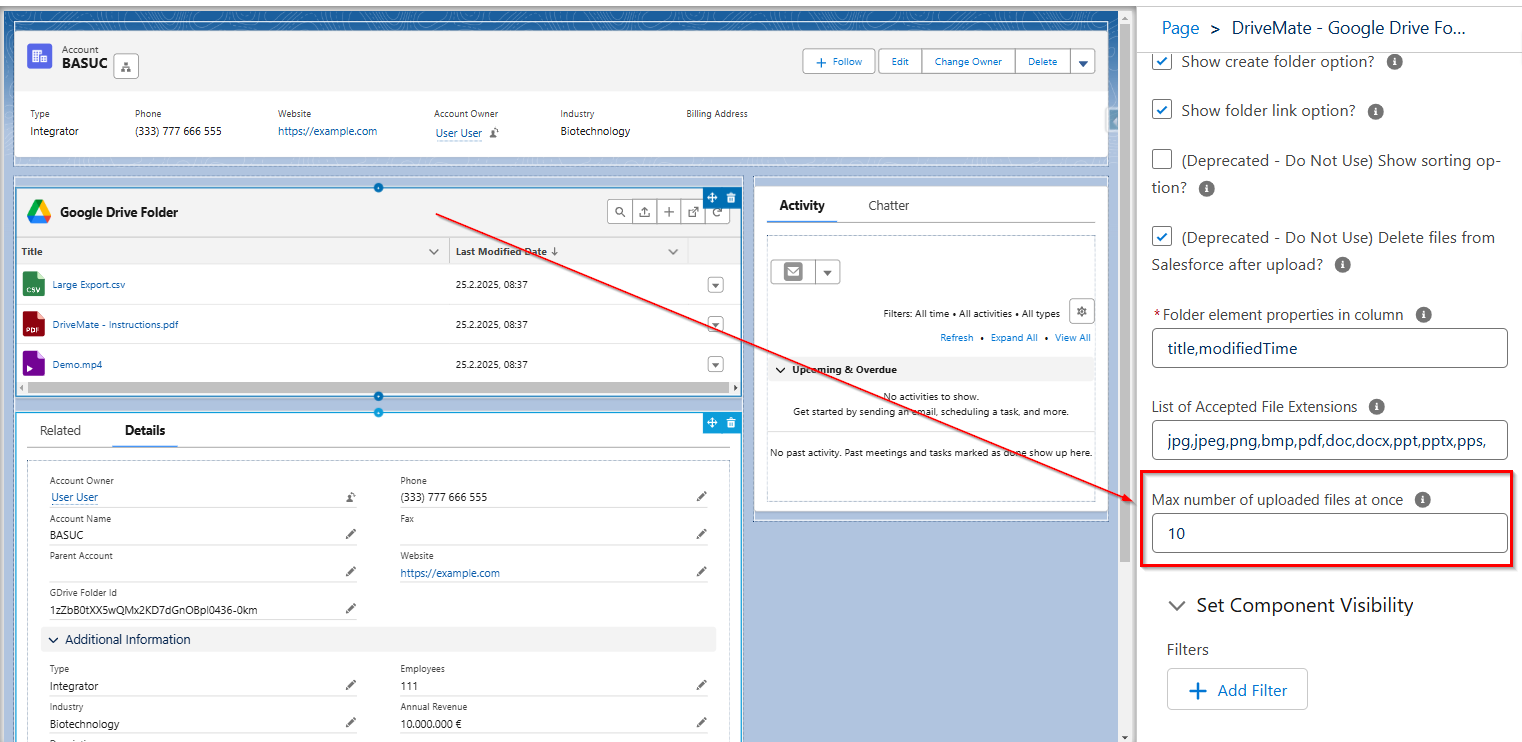
<p>Admins can now specify how many files the user will be allowed to upload at once via the DriveMate component. This can be specified by modifying the <code>Max number of uploaded files at once</code> component attribute.</p>
<p><img decoding="async" loading="lazy" alt="Max number of uploaded files configuration" src="https://drivemate.forciit.com/assets/images/maxFilesConfiguration-3c3ece7dfd016e6948edd63293b56ba6.png" width="1522" height="742" class="img_ev3q"></p>
<h4 class="anchor anchorTargetStickyNavbar_Vzrq" id="additional-filefolder-action---open-download-move-to-trash">Additional file/folder action - open, download, move to trash<a href="https://drivemate.forciit.com/release-notes/2.5#additional-filefolder-action---open-download-move-to-trash" class="hash-link" aria-label="Direct link to Additional file/folder action - open, download, move to trash" title="Direct link to Additional file/folder action - open, download, move to trash" translate="no">​</a></h4>
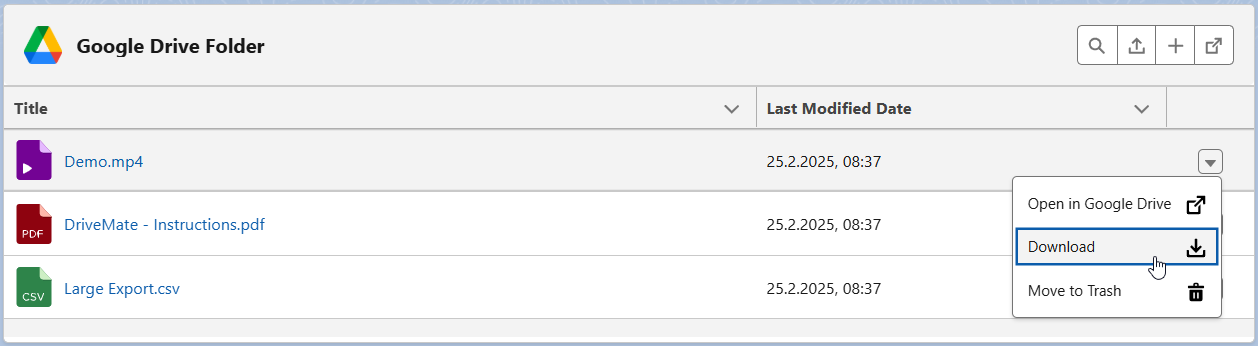
<p>The DriveMate component supports now individual actions for files and folders.</p>
<p><img decoding="async" loading="lazy" alt="Additional file/folder actions" src="https://drivemate.forciit.com/assets/images/individualActions-69f2d6a825a9ba32c0361ae277b08e4c.png" width="1258" height="346" class="img_ev3q"></p>
<p>Actions available for files:</p>
<ul>
<li class="">Open in Google Drive</li>
<li class="">Download</li>
<li class="">Move to Trash</li>
</ul>
<p>Actions available for folders:</p>
<ul>
<li class="">Open in Google Drive</li>
<li class="">Move to Trash</li>
</ul>
<h4 class="anchor anchorTargetStickyNavbar_Vzrq" id="improved-sorting-experience">Improved Sorting Experience<a href="https://drivemate.forciit.com/release-notes/2.5#improved-sorting-experience" class="hash-link" aria-label="Direct link to Improved Sorting Experience" title="Direct link to Improved Sorting Experience" translate="no">​</a></h4>
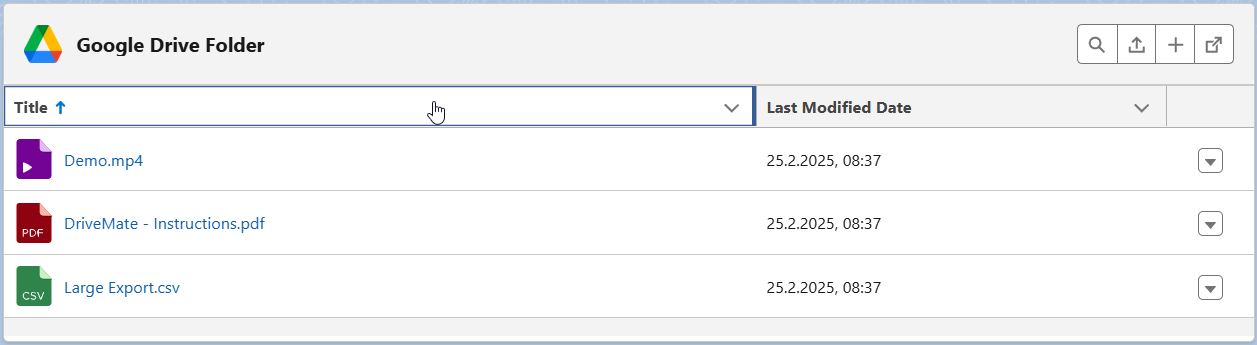
<p>Component files and folders can be now sorted by clicking on the certain column header.</p>
<p>Elements can be sorted either by date fields, or by title.</p>
<p><img decoding="async" loading="lazy" alt="DriveMate component sorting" src="https://drivemate.forciit.com/assets/images/filesSorting-4b197d77d6ccddd7c83563a0c1480e27.png" width="1257" height="345" class="img_ev3q"></p>
<h4 class="anchor anchorTargetStickyNavbar_Vzrq" id="improved-search-experience">Improved Search Experience<a href="https://drivemate.forciit.com/release-notes/2.5#improved-search-experience" class="hash-link" aria-label="Direct link to Improved Search Experience" title="Direct link to Improved Search Experience" translate="no">​</a></h4>
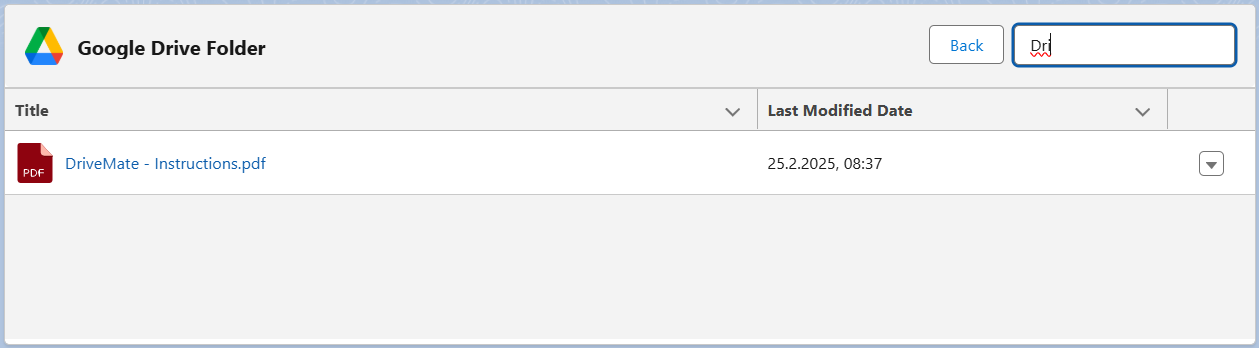
<p>Searching of the folder elements happens now real-time as the user types in the search bar. There is no need to submit the search.</p>
<p><img decoding="async" loading="lazy" alt="DriveMate component search" src="https://drivemate.forciit.com/assets/images/filesSearch-023949907df63e2d80df36c40acfc854.png" width="1259" height="348" class="img_ev3q"></p>
<h4 class="anchor anchorTargetStickyNavbar_Vzrq" id="pagination-replacement-with-scroll">Pagination Replacement with Scroll<a href="https://drivemate.forciit.com/release-notes/2.5#pagination-replacement-with-scroll" class="hash-link" aria-label="Direct link to Pagination Replacement with Scroll" title="Direct link to Pagination Replacement with Scroll" translate="no">​</a></h4>
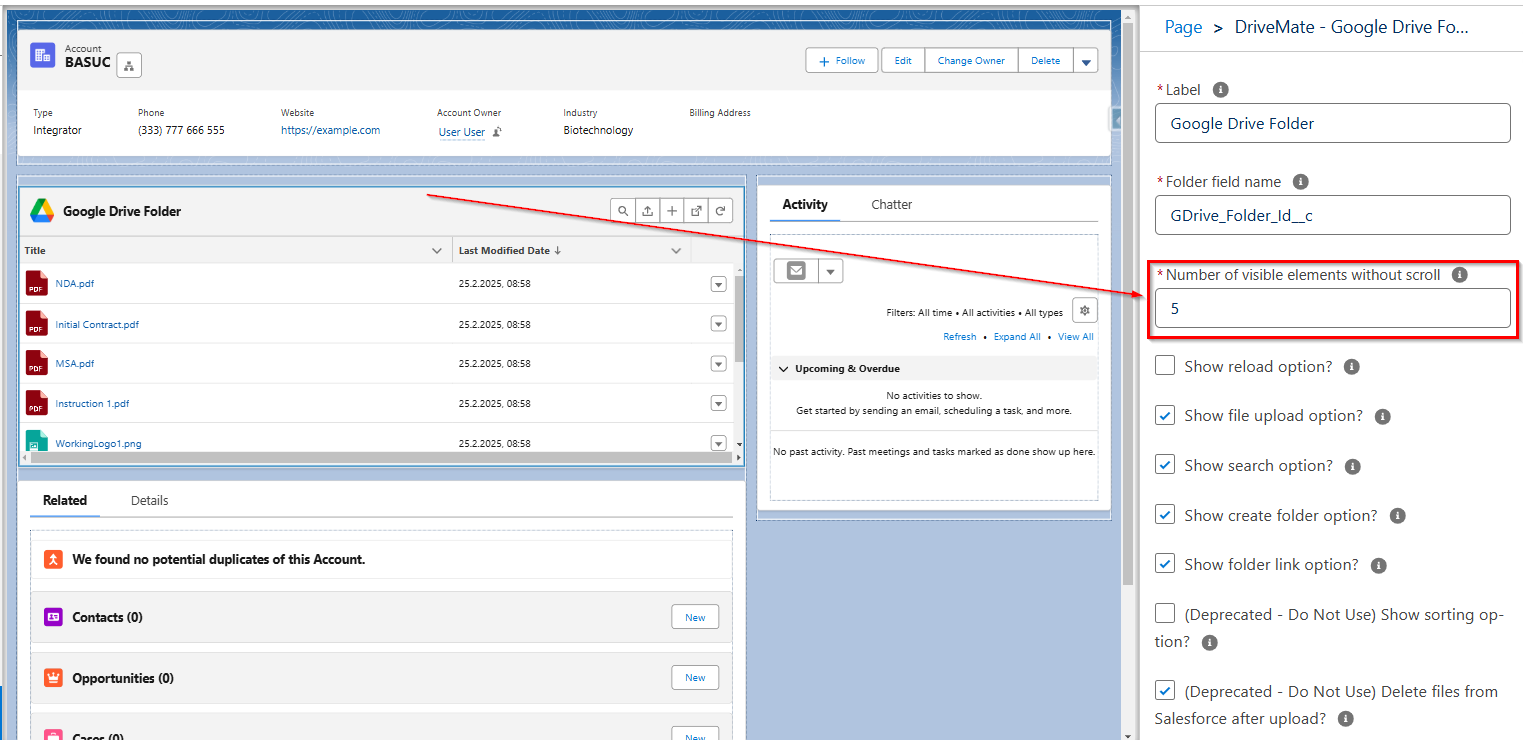
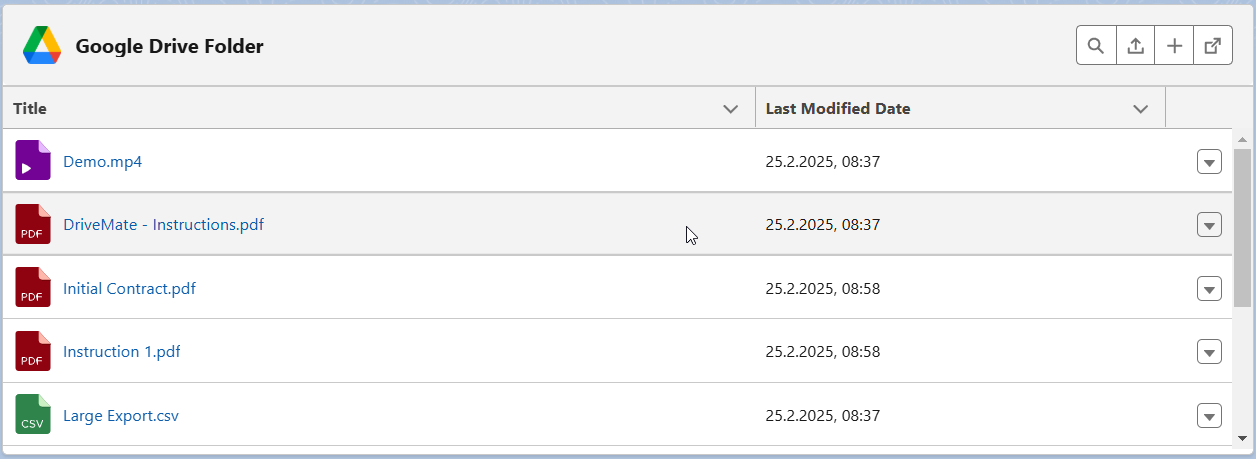
<p>The pagination mechanism was replaced with a scroll mechanism. The attribute controlling the number of displayed elements per page was renamed to <code>Number of visible elements without scroll</code>.</p>
<p><img decoding="async" loading="lazy" alt="DriveMate component scroll configuration" src="https://drivemate.forciit.com/assets/images/scrollConfiguration-7a41ac2583933f8a386c72bfa6680318.png" width="1523" height="740" class="img_ev3q"></p>
<p><img decoding="async" loading="lazy" alt="DriveMate component scroll view" src="https://drivemate.forciit.com/assets/images/scrollView-d3dbc433426b53a95a28685ba69df396.png" width="1256" height="459" class="img_ev3q"></p>
<h4 class="anchor anchorTargetStickyNavbar_Vzrq" id="deprecated-component-attributes">Deprecated Component Attributes<a href="https://drivemate.forciit.com/release-notes/2.5#deprecated-component-attributes" class="hash-link" aria-label="Direct link to Deprecated Component Attributes" title="Direct link to Deprecated Component Attributes" translate="no">​</a></h4>
<p>The <code>Show sorting option?</code> and <code>Delete files from Salesforce after upload?</code> attributes are now deprecated and changing their value has no effect on the component.</p>
<h2 class="anchor anchorTargetStickyNavbar_Vzrq" id="upgrade-required-actions">Upgrade Required Actions<a href="https://drivemate.forciit.com/release-notes/2.5#upgrade-required-actions" class="hash-link" aria-label="Direct link to Upgrade Required Actions" title="Direct link to Upgrade Required Actions" translate="no">​</a></h2>
<p>If you upgrade from the existing DriveMate version lower than 2.5, you will need to go through all configuration steps described on the new setup page - see details in the <a href="https://drivemate.forciit.com/release-notes/2.5#setup-page-for-app-configuration" class="">Setup Page for App Configuration</a> section.</p>
<h3 class="anchor anchorTargetStickyNavbar_Vzrq" id="new-permission-set-group-for-drivemate-app-access">New Permission Set Group for DriveMate App Access<a href="https://drivemate.forciit.com/release-notes/2.5#new-permission-set-group-for-drivemate-app-access" class="hash-link" aria-label="Direct link to New Permission Set Group for DriveMate App Access" title="Direct link to New Permission Set Group for DriveMate App Access" translate="no">​</a></h3>
<p>We introduced a new permission set group - <code>DriveMate User Access</code> - to grant users access to the <em>DriveMate</em> app. It contains the already existing <code>DriveMate User</code> permission set and a new one - <code>DriveMate Integration Access</code>.</p>
<p>The assignment of the new permission set group is one of the setup steps described on the new <a href="https://drivemate.forciit.com/release-notes/2.5#setup-page-for-app-configuration" class="">setup page</a>.</p>
<h3 class="anchor anchorTargetStickyNavbar_Vzrq" id="updated-named-credentials-for-google-drive-integration">Updated Named Credentials for Google Drive Integration<a href="https://drivemate.forciit.com/release-notes/2.5#updated-named-credentials-for-google-drive-integration" class="hash-link" aria-label="Direct link to Updated Named Credentials for Google Drive Integration" title="Direct link to Updated Named Credentials for Google Drive Integration" translate="no">​</a></h3>
<p><em>DriveMate</em> is now using an updated version of Salesforce Named Credentials to integrate with Google Drive. This version of named credentials is a new Salesforce-recommended way of connecting to external systems.
Go through the configuration steps on the <a href="https://drivemate.forciit.com/release-notes/2.5#setup-page-for-app-configuration" class="">setup page</a> to set it up correctly.</p>]]></content>
        <category label="release" term="release"/>
        <category label="DriveMate 2.5" term="DriveMate 2.5"/>
        <category label="file management" term="file management"/>
        <category label="per user authorization" term="per user authorization"/>
        <category label="Google Drive Folder component customizations" term="Google Drive Folder component customizations"/>
    </entry>
</feed>